You have Java script turned off.
You cannot view the images in full size.
CANable 2.5 Firmware from ElmüSoft - Slcan & Candlelight
While I added support for CANable adapters to
HUD ECU Hacker I found so
many issues that I ended up writing a new firmware.
The official firmware that you find on Github and that comes with the adapters bought in China is of low quality .
Here you find the first CANable firmware that can be used for professional CAN bus applications.
I united 2 formerly separate firmware projects Slcan and Candlelight into one project with a common code base .
The new CANable 2.5 firmware is high quality and open-source .
If you noticed in the legacy firmware that CAN communication did not work you had no chance to find out why.
Here you find the first CANable firmware with correctly implemented error handling telling you what is wrong.
Although many new features were added, the new firmware is 100% backward compatible with legacy software.
The firmware has been tested successfully with CAN FD baudrates up to 10 Mega baud .
The firmware has been designed to be easily expandable for future requirements.
The firmware has been written by a software developer with 40+ years of programming, reverse engineering and electronic experience.
Additionally with
HUD ECU Hacker you get a powerfull tool with lots of features, the
swiss knife for CAN bus.
Additionally you get a high speed
CAN Raw Terminal that supports all the new features, but works also with legacy adapters.
You can grab logfiles of CAN bus traffic.
You can decode the CAN bus protocols ISO 15765 , J1939 and NMEA 2000 that are used in motorbikes, cars, trucks and vessels.
You can provide a DBC file that HUD ECU Hacker uses to decode CAN bus traffic.
You can write ultra fast macro scripts that communicate with devices on CAN bus.
This firmware is ranked under the
Top Ten in the embedded category on
oosmetrics .
1.) User Manual
Firmware Comparison
The legacy firmware on Github had many bugs and the legacy Candlelight protocol had several design errors .
Therfore I have created a new efficient protocol : The ElmüSoft protocol .
By default the firmware 2.5 works in legacy mode and is backward compatible with all legacy software on Windows, Linux, MAC.
The new features are only available if the computer software switches the firmware into ElmüSoft mode.
Feature Legacy Firmware (Candlelight / Slcan) ElmüSoft Firmware (Candlelight / Slcan)
Quality
Many bugs. In the worst case resulting in a firmware crash.
All bugs have been fixed. See Bugfixes
USB Driver
Slcan: No problem
The WinUSB driver is installed automatically in less than a second. See MS OS Descriptor
CAN Bus Errors
Slcan: Errors are not reported
The firmware sends detailed error and status messages to the computer. See CAN bus Errors
Command Feedback
Not implemented.
If the firmware receives an invalid command (e.g. unsupported baurate) it responds with a feedback error code. See Feedback Codes
Tx Echo
Slcan: Not availableFake Echo
The firmware can send a Tx echo marker which informs the computer when a CAN packet has been acknowledged on CAN bus. See Echo Marker
USB Transfer Speed
Candlelight uses the slow and misdesigned Geschwister Schneider protocol that sends always 80 bytes over USB for any CAN FD packet no matter how many data bytes it has.
The ElmüSoft Candlelight protocol adds only a 2 byte header to transfer a CAN packet as fast as possible over USB. Additionally multiple CAN packets are sent without USB overhead in one USB blob . ElmüSoft Candlelight is 3 times faster than Geschwister Schneider. See Speed Comparison
Hardware CAN Filter
Not implemented.
The user can define in up to 8 CAN filters which packets are sent to the computer. See Host Filter
Busload Report
Not implemented.
The firmware calculates and reports the current Busload .
Baudrate / Samplepoint
No feedback if your calculation of Prescaler, Segment 1 and Segment 2 are correct.
The firmware calculates and reports the actual Baudrate and Samplepoint from your settings and if nominal / data settings match correctly.
Pin BOOT0
Wrongly designed hardware with legacy firmware lets the adapter go into Firmware Update (DFU) mode alone when rebooting the computer. This really sucks!
As a workaround the firmware allows to disable processor pin BOOT0, so the adapter never enters boot mode, except you want it. See Hardware Misdesign
Enter DFU mode
Slcan: Not implemented
The computer software can switch the adapter into Firmware Update mode by command. A boot mode jumper or hardware switch are not needed anymore. See Enter DFU Mode
Multi-Channel Adapters
Slcan: Not supported
Full support of multi-channel adapters. Each channel creates it's own USB interface, so each channel can be opened independently by another application on Windows/Linux. See Multi Channel Adapters
CAN Bridge
Not available
Adapters with multiple CAN channels can act as a CAN bridge that automatically forwards packets to another CAN channel configurable with 20 filters. See CAN Bridge
Read / Write Flash Memory
Not available
The firmware occupies only a small part of the processor's flash memory. You can write your own data into the free space and read it back. See Read/Write Flash Memory
Future Expansions
Slcan: Possible
The ElmüSoft protocol has been designed to be flexible and expandable. New features can be added easily in the future (e.g. LIN bus).
Software Support
Any legacy software: SavvyCAN, gs_usb, can-utils, ttyACM, SocketCAN, python-can, etc. Legacy software also works with the new ElmüSoft firmware in legacy mode.
HUD ECU Hacker and the C++, C# and Python Demo Applications for Windows and Linux switch the adapter into ElmüSoft mode and fully support the new features.
Firmware Update
Extremely clumsy on Windows with the ugly ST Cube Programmer. Many legacy Github projects do not offer pre-compiled binary files for download.
Windows: Ultra easy firmware update with one click in the Firmware Programmer See Firmware Upload
Sourcecode
Sloppy code without comments.
You get very clean Firmware Sourcecode and three ready-to-use classes for host software in C++, C# and Python for Windows and Linux with plenty of detailed comments.
CANable v1.0 Adapters
The older CANable 1.0 adapters with STM32F xxx processors are not supported by this firmware.
They are obsolete. They do not support CAN FD.
You can buy a modern WeActStudio v2 adapter for $9 US. There is no reason to struggle with legacy hardware.
CANable v2.0 Adapters
The newer CANable 2.0 / CANable 2.0 Pro adapters with STM32G xxx processors support CAN FD with up to 5, 8 or 10 Mbaud.
The majority of adapters listed below completely isolate the CAN side from the USB side. Several adapters use these chips:
The ADM3050E is an isolated CAN Transceiver (
Datasheet )
The B05050S-1WR3 is an isolated DC-DC Converter (
Datasheet ).
Most adapters have a
switch that can connect a 120 Ω
termination resistor to CAN bus. See chapter
CAN Hardware .
When you connect to the CAN bus of a vehicle you must turn this resistor OFF .
When you make tests between 2 adapters on your desk you must turn the resistors ON in both adapters.
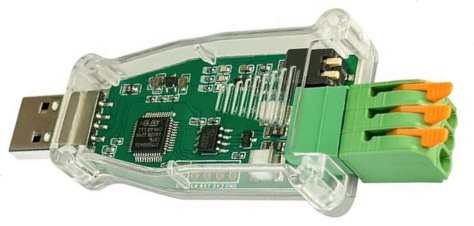
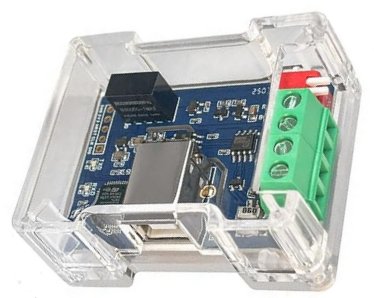
Multiboard Adapters
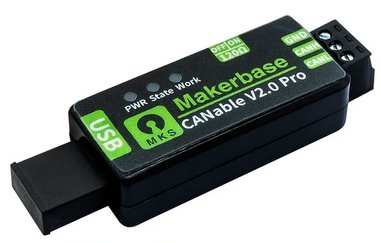
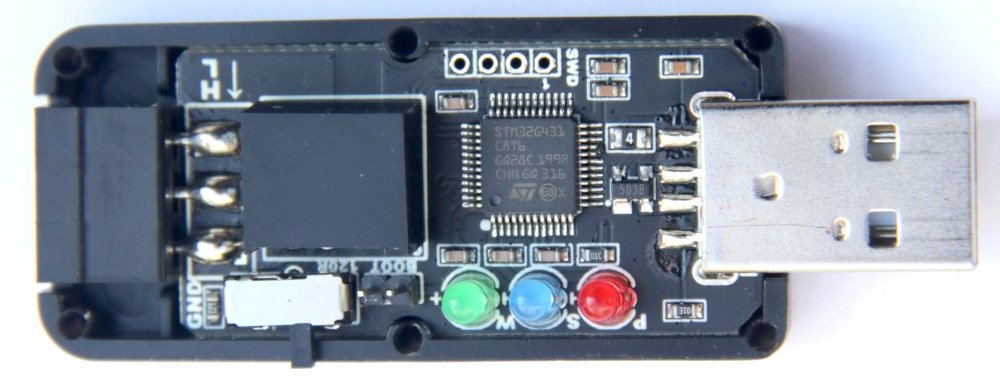
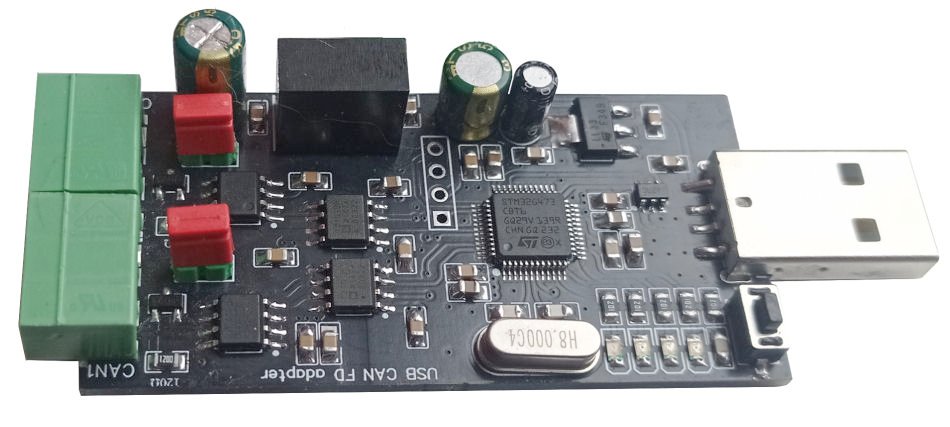
MKS Makerbase Show Full Size
MKS Makerbase Show Full Size
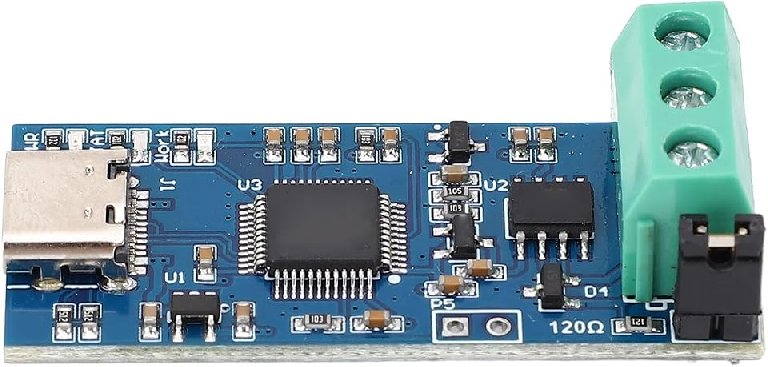
Walfront Show Full Size
These cheap boards have no quartz. The RC oscillator in the processor has only a precision of 1%.
The MKS Makerbase adapter (see
details ) supports CAN traffic up to
10 Mega baud .
I asked MKS Makerbase to send me a diagram of their adapter, but they never answer on none of their email addresses.
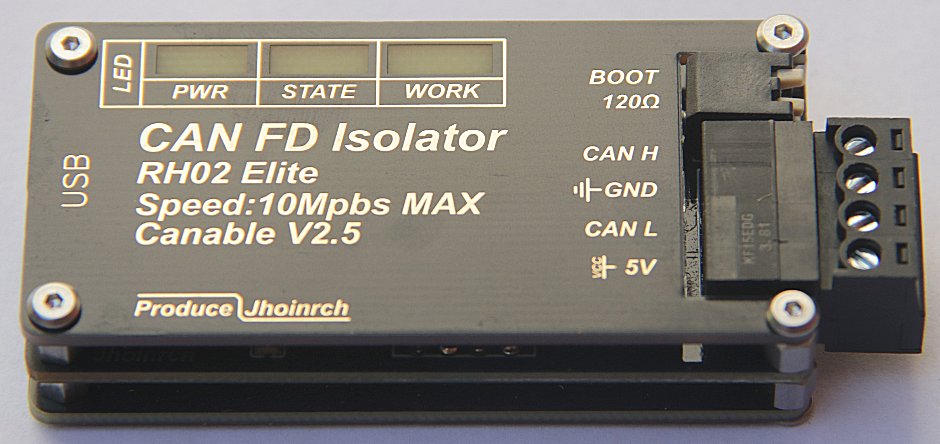
Jhoinrch RH02 Plus / Elite
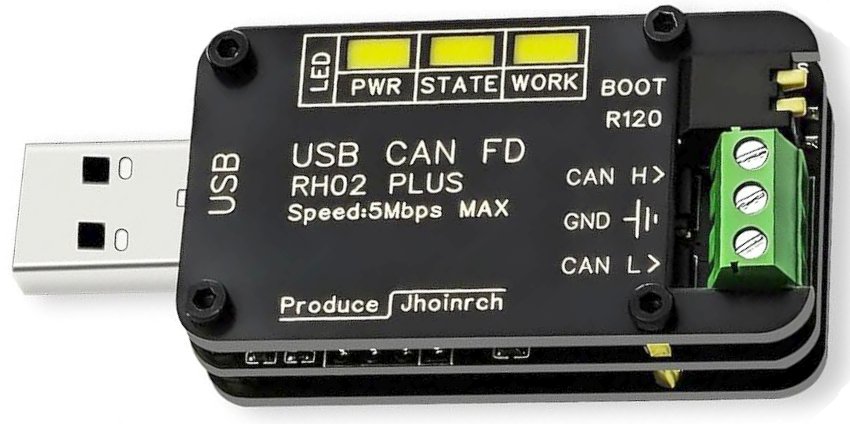
RH02 Plus Show Full Size
RH02 Elite Show Full Size
Jhoinrch in China is the first company that uses my CANable 2.5 as stock firmware for their
RH02 adapters .
The
Plus and the
Elite adapters (see
details ) have a STM32G431 processor and since 2026 also a 25 MHz quartz.
Here you can download the
diagram of the RH02 Elite (PDF).
DSD Tech SH-C31
SH-C31A Show Full Size
SH-C31G Show Full Size
DSD-Tech in China uses my CANable 2.5 as stock firmware for their USB to CAN adapters (see
details ).
They provided me with the
diagrams of the
SH-C31A and the
SH-C31G (PDF).
They even publish the schematic, open source PCB layout, datasheet and a manual on
Github .
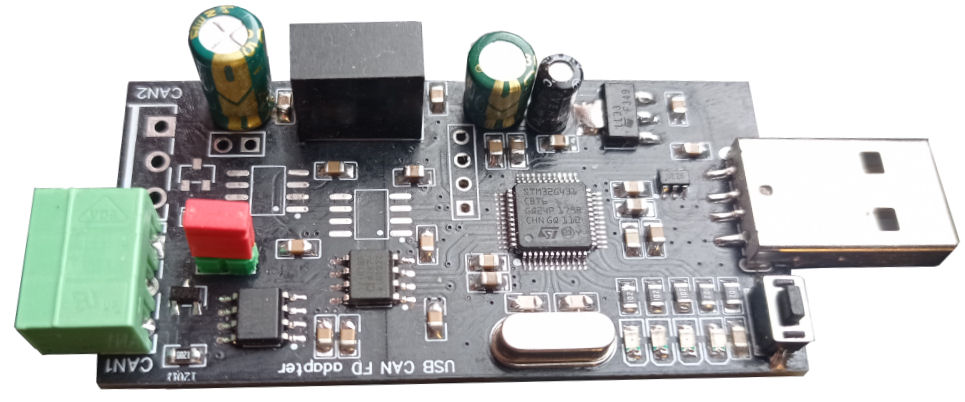
WeActStudio USB2CANFD v1
Show Full Size
The
WeActStudio USB2CANFD v1 is a cheap (see
details ) and small (4 x 2 cm) adapter with STM32G0B1 processor.
They have published the
diagram (PDF).
The hardware is OK, but the CAN clock is only 60 MHz, which limits the available
samplepoints for CAN FD.
Do not buy the v1 adapter. Buy the new v2 adapter instead.
WeActStudio installs a fix 'firmware updater' in the flash memory although the processor has a factory bootloader.
They force you to use their proprietary software for flashing, which is only for Windows.
You can only upload a firmware after using another proprietary software that converts it into an FPK file .
Additionally your firmware must be compiled to work with their proprietary 'firmware updater'.
They even prohibit to remove their 'firmware updater' because they have disabled the bootloader pin .
And on top of this they put a useless write protection and a read protection on this 'firmware updater'.
They programmed the processor to erase the entire flash memory when the read protection is turned off.
WeActStudio sells you a crippled adapter . They do not allow you to chose which firmware you want to use.
There is no easy way to remove their 'firmware updater' and the several protections and to enable pin BOOT0.
They force you to buy a ST-Link adapter , solder 4 pins to the board, install the STM Cube Programmer ,
which is a monster of of 1.5 GB and manually manipulate the option bytes which is risky.
Cube Programmer is a garbage that mostly does not connect to the adapter without even showing an error message.
But you are lucky: The HUD ECU Hacker
Firmware Programmer removes all this WeAct stuff with
one click .
To achieve this I had to write a firmware that I upload with the Y-Modem protocol through their firmware updater.
My 'ElmüSoft Restore Adapter' firmware removes all this crap and leaves a clean and unprotected flash memory.
Just click the button Enter DFU Mode , then you can upload the CANable 2.5 firmware via DFU protocol.
WeActStudio USB2CANFD v2
Show Full Size
The successor USB2CANFD version 2 is cheap (see
details ) and has a STM32G431 processor.
It has a BOOT0 button and a correctly designed hardware. You will have no problems with this board.
WeActStudio has published the
diagram (PDF).
Oleksii CAN-Module Dual
Solo Show Full Size
Dual Show Full Size
Can-Module from Oleksii in Ukraine uses my CANable 2.5 as stock firmware for the
Dual Channel Adapter .
It offers 2 CAN channels, has a STM32G473 processor and a 8 MHz quartz (see
details ).
ATTENTION:
This adapter has a severe hardware design error . After updating the firmware it will always be in DFU mode .
Read the next chapter.
Hardware Misdesign
A correctly designed USB adapter should work immediately when you plug in the USB cable.
But some adapters with STM32G4 xx processor may enter DFU Mode alone. Then you see in Control Panel:
'ST Microelectronics Device in DFU (Device Firmware Upgrade) Mode' is also called Bootloader Mode .
In Boot Mode the processor runs it's internal factory bootloader and is ready to receive a firmware update .
In Boot Mode only the power LED is on.
To switch your adapter to CAN bus mode try to disconnect the USB cable, wait 5 seconds and reconnect.
If this does not work (Oleksii adapters) you must use the
Firmware Programmer to disable pin BOOT0.
In a correctly designed hardware the boot mode should only be enabled when the Boot Mode jumper is set.
But the cheap version of the STM32G4xx processor (LQFP48) has only a limited amount of pins.
ST Microelectronics offers only 2 options for the CAN Rx and Tx pins, which are both not useful:
1.) Pins PA11 and PA12 could be configured for CAN bus, but they are already occupied with USB.
2.) So the only other option must be used: pins PB8 and PB9. But pin PB8 is also the BOOT0 pin.
This is an extremely stupid processor design.
Wrong Hardware Show Full Size
Correct Hardware Show Full Size
When the pin BOOT0 is High during power ON the processor goes into Bootloader Mode .
To avoid this the hardware must assure that the CAN Rx pin is Low when the processor is reset.
Therefore some adapters use 2 transistors to delay the power supply for the CAN transceiver.
In the adapters from MKS Makerbase this delay is far to long.
The consequence is that short interruptions of the 5V USB power will immediately enter Boot Mode.
This happens when you merely move the USB plug a little bit or when you reboot the computer.
During a reboot the mainboard interrupts the USB power supply for a short time.
This misdesign really sucks . Therefore my CANable 2.5 firmware offers a solution: You can disable the pin BOOT0.
The adapters from Oleksii are the worst: If you don't disable pin BOOT0 you cannot use them at all.
The adapters from Jhoinrch and WeActStudio have a more intelligent hardware design, they don't have this problem.
Official Firmware for STM32G431
The CANable adpters use an open source firmware that was first developed by Geschwister Schneider .
Later it was adapted on Github to multiple processors and CAN FD support was added.
There are 2 versions: CANable 1.0 for older processors and version 2.0 with CAN FD support.
A big problem is the low quality and low speed of the officially available firmware.
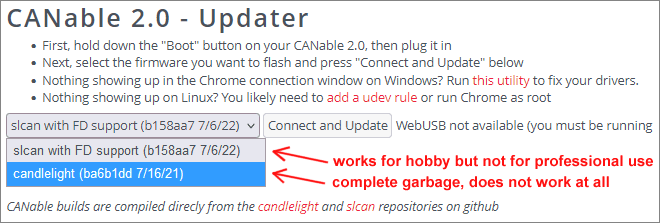
Here you see the web updater on canable.io that offers 2 different firmware types.
canable.io Web Updater Show Full Size
This web updater works only in Chrome and requires that you install a driver which gives a website access to your USB devices.
I would never do that. This opens a security hole.
Slcan Protocol
When you connect a CANable with Slcan firmware a COM port will appear on Windows.
The entire communcation with CAN bus is transferred as ASCII characters.
This is a highly inefficient way to transmit binary data over a USB cable.
For each byte that you send to CAN bus two bytes must be transferred over USB.
The USB speed is limited to 12 Mbit/s but CAN bus can reach speeds up to 10 Mbaud.
The only advantage of the Slcan protocol is that it is simple .
There are even people who send commands manually to the adapter in Teraterm.
Slcan is for people who play around with CAN bus at the hobby level.
But Slcan is slow and not recommended for any professional use.
Candlelight Protocol
The Candlelight protocol sends binary data over USB and could theoretically make the best use of the USB speed.
But the official firmware from canable.io does not even implement CAN FD .
A correctly working Candlelight firmware for the STM32G431 processor did not exist nowhere.
I'am the first one who releases a functional Candlelight firmware for the STM32G431.
And my Candlelight 2.5 firmware implements a new protocol that optimizes USB data transfer to the maximum.
However, my firmware is still 100% backward compatible with the legacy protocol.
USB Data Transfer Speed
1.) Protocol Overhead:
The following table compares the efficiency of different firmware versions receiving a CAN FD packet.
The payload in this example consists of a 29 bit CAN ID + 16 data bytes + flags = 21 byte.
19F50C02: 00 01 02 03 04 05 06 07 08 09 0A 0B 0C 0D 0E 0F (FDF, BRS)
Firmware Payload Transferred over USB Efficiency Legacy Official Slcan 21 byte Payload x 2 + 2 = 44 byte 48 % ElmüSoft Slcan 2.5 21 byte Payload x 2 + 2 = 44 byte 48 % Legacy Official Candlelight 21 byte CAN FD not implemented 0 % ElmüSoft Candlelight 2.5 21 byte Payload + 2 = 23 byte 91 %
As you see the ElmüSoft Candlelight protocol has been highly optimized for the highest USB throughput.
2.) USB Overhead:
USB Full Speed Transfer Show Full Size
USB requires sending an overhead of SYNC, DATA1, CRC, EOP, an ACK packet and 2 x inter-packet gap.
This USB overhead must always be sent, no matter how many payload data bytes the USB packet transfers.
USB Payload USB Overhead Transferred over USB Efficiency 1 byte = 8 bit 60 bits 68 bits (8 + 60) 11% (8 / 68)4 bytes = 32 bit 60 bits 92 bits (32 + 60) 34% (32 / 92)8 bytes = 64 bit 60 bits 124 bits (64 + 60) 51% (64 / 124)
The larger the payload, the better becomes the USB troughput.
The ElmüSoft protocol improves USB speed by sending as much as possible frames in one BLOB (Binary Large Object).
The new Candlelight protocol can pack up to 250 frames with up to 2048 byte into one USB blob.
Blobs are only sent at very high CAN speeds if there are multiple frames waiting in the USB FIFO.
Speed Tests show that the ElmüSoft Candlelight protocol transfers 3 times more CAN traffic than legacy Candlelight.
Legacy Candlelight Installation not working
When you connect a CANable with Candlelight firmware, Windows should install the WinUSB driver automatically.
This works only if the firmware responds correctly to the Microsoft OS descriptor request.
Windows asks the firmware which driver it needs and the firmware tells Windows that it needs a WinUSB driver.
As simple as this is, you will not find any official firmware where this is implemented 100% correctly.
And the official firmware from canable.io is even such a crap that no driver is installed at all.
This was another reason why I had to write a new firmware.
When you upload the new Candlelight 2.5 firmware from ElmüSoft, Windows will instantly install 2 drivers.
This happens so fast that you don't even notice it. There will be no window telling you that a driver is installed.
Windows installs the driver invisibly in the background in one second.
Microsoft OS Descriptor Request
My new Candlelight 2.5 firmware is the first Candlelight firmware that works 100% correctly on Windows.
Now you can test this on your own: Open your adapter with HUD ECU Hacker and you see all details in the Trace pane.
HUD ECU Hacker sends the Microsoft OS descriptor requests to the adapter and shows the adapter responses .
There are 3 requests that the adapter must answer correctly for 2 interfaces.
1.)
Here you see the correct response of the CANable 2.5 firmware:
String ID: 0xEE, Signature: "MSFT100", VendorCode: 0x20 Interface: 0, Version: 1.00, MS Compatible ID: "USB\MS_COMP_WINUSB" Interface: 1, Version: 1.00, MS Compatible ID: "USB\MS_COMP_WINUSB" Interface: 0, Property: "DeviceInterfaceGUIDs", Type: MultiString, Data: "{c15b4308-04d3-11e6-b3ea-6057189e6443}\0\0" Interface: 1, Property: "DeviceInterfaceGUIDs", Type: MultiString, Data: "{c25b4308-04d3-11e6-b3ea-6057189e6443}\0\0"
Interface 0 is the Candlelight interface and Interface 1 is the DFU Firmware Update interface.
Both interfaces need a unique identifier (GUID) so Windows can install a driver for each interface.
2.)
This is the response of a legacy Candlelight 1.0 firmware that does not have a version number:
String ID: 0xEE, Signature: "MSFT100", VendorCode: 0x20 Interface: 0, Version: 1.00, MS Compatible ID: "USB\MS_COMP_WINUSB" Interface: 1, Version: 1.00, MS Compatible ID: "USB\MS_COMP_WINUSB" Interface: 0, Property: "DeviceInterfaceGUIDs", Type: MultiString, Data: "{c15b4308-04d3-11e6-b3ea-6057189e6443}\0\0" Interface: 1, Error requesting MS OS Extended Properties descriptor. The device has a buggy firmware. The driver for the firmware update (DFU) interface cannot be installed automatically.
3.)
And the worst is the Candlelight firmware
ba6b1dd from the canable.io
Web Updater .
No driver is installed at all because the firmware does not respond to the MS OS descriptor request. This firmware is garbage .
Zadig
The consequence using this buggy canable.io firmware is that Windows cannot install the WinUSB driver.
In internet people were told to use Zadig as a workaround to force a driver installation for this buggy firmware.
But Zadig is garbage software, that installs the driver with a totally wrong random GUID into the registry.
If the adapter is not installed with the correct Candlelight GUID c15b4308-04d3-11e6-b3ea-6057189e6443 it will not be found.
Any CAN software will tell you that no adapter is connected if it is installed with a wrong GUID.
If you have corrupted your registry by using Zadig, HUD ECU Hacker can help you: Start the Firmware Programmer .
It will check all registry entries of connected Candlelight devices and it will fix registry errors automatically.
Driver Registry Correction Show Full Size
Never use Zadig! It will screw up your registry.
With the new Candlelight firmware 2.5 Windows will install the WinUSB driver automatically and correctly.
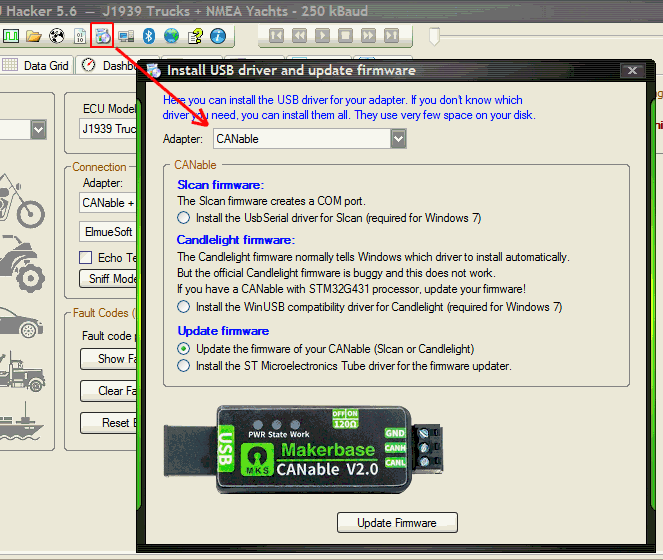
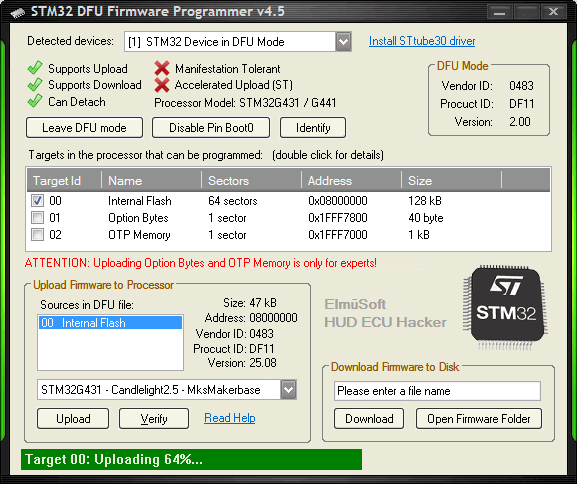
The new Firmware Programmer
HUD ECU Hacker has a built-in
Firmware Programmer for all STM32 processors, also for legacy CANable 1.0
HUD ECU Hacker Show Full Size
Firmware Programmer Show Full Size
After installing HUD ECU Hacker you can chose between the following CANable 2.5 firmware versions.
IMPORTANT: If you don't find your adapter in this table but you find an identical photo, then try this firmware.
Some adapters (e.g. Walfront) are sold by many companies under different brand names .
Adapter Photo Quartz CAN CAN LED BOOT0 CAN Chip Price Firmware File Names
WeActSudio USB2CANFD v1 deprecated 16 MHz
60 MHz Single
A1,A0
OK
SIT 1044
$9
STM32G0B1 -Slcan2.5-WeActSudioV1.dfu
STM32G0B1 -Candlelight2.5-WeActSudioV1.dfu
WeActSudio USB2CANFD v2 16 MHz
160 MHz
Single
A1,A0
OK
CA-IS2062
$9
STM32G431 -Slcan2.5-WeActSudioV2.dfu
STM32G431 -Candlelight2.5-WeActSudioV2.dfu
MKS None 160 MHz
Single
A0,A15
Bad
ADM 3050
$12
STM32G431 -Slcan2.5-Multiboard.dfu
STM32G431 -Candlelight2.5-Multiboard.dfu
DSD Tech None 160 MHz
Single
A0,A15
Bad
TJA 1051not isolated
$17
STM32G431 -Slcan2.5-Multiboard.dfu
STM32G431 -Candlelight2.5-Multiboard.dfu
DSD Tech None 160 MHz
Single
A0,A15
Bad
TJA 1051
$25
STM32G431 -Slcan2.5-Multiboard.dfu
STM32G431 -Candlelight2.5-Multiboard.dfu
Jhoinrch 25 MHz
160 MHz
Single
A0,A15
OK
SIT 1051not isolated
$20
STM32G431 -Slcan2.5-Jhoinrch.dfu
STM32G431 -Candlelight2.5-Jhoinrch.dfu
Jhoinrch 25 MHz
160 MHz
Single
A0,A15
OK
ADM 3050
$28
STM32G431 -Slcan2.5-Jhoinrch.dfu
STM32G431 -Candlelight2.5-Jhoinrch.dfu
Walfront withnaked board None 160 MHz
Single
A0,A15
Bad
TJA 1051not isolated
$12
STM32G431 -Slcan2.5-Multiboard.dfu
STM32G431 -Candlelight2.5-Multiboard.dfu
Walfront withnaked board None 160 MHz
Single
A0,A15
Bad
TJA 1051not isolated
$12
STM32G473 -Slcan2.5-Multiboard.dfu
STM32G473 -Candlelight2.5-Multiboard.dfu
Oleksii Solo naked board 8 MHz
160 MHz
Single
A5,A6
Worst
TJA 1044
$20
STM32G431 -Slcan2.5-OleksiiSolo.dfu
STM32G431 -Candlelight2.5-OleksiiSolo.dfu
Oleksii Dual naked board 8 MHz
160 MHz
Dual
A5,A6
Worst
TJA 1044
$25
STM32G473 -Slcan2.5-OleksiiDual.dfu
STM32G473 -Candlelight2.5-OleksiiDual.dfu
Openlight Labs sold out None 160 MHz
Single
B11,A15
Bad
TJA 1051not isolated
$35 STM32G431 -Slcan2.5-OpenlightLabs.dfu
STM32G431 -Candlelight2.5-OpenlightLabs.dfu
BigTreeTech U2C v2 8 MHz
60 MHz Single
No Rx, OK
TJA 10501 Mbaud
$25
STM32G0B1 -Slcan2.5-BigTreeTechU2C.dfu
STM32G0B1 -Candlelight2.5-BigTreeTechU2C.dfu
BOOT0 Pin = OK means that the hardware design does not require to disable pin BOOT0.
BOOT0 Pin = Bad means wrong design: pin BOOT0 must be disabled to avoid that the board goes into boot mode alone.
BOOT0 Pin = Worst means worst design: the board does not work at all if pin BOOT0 is not disabled.
IMPORTANT: All firmware DFU files are different.
Only one Slcan firmware and only one Candlelight firmware file matches your adapter.
If you upload the wrong firmware the adapter will work only partially or not at all.
The firmware is ready for the STM32G4xx serie and the STM32G0xx serie. It can be extended for other processors.
The HUD ECU Hacker Firmware Programmer can flash any STM32 processor, also in older CANable 1.0 adapters.
Flashing the CANable is no risk. The processor has a hard-coded bootloader that cannot be destroyed.
When after connecting the USB cable the LED's are not blinking alternatingly, the firmware is not working.
This may happen after uploading the wrong firmware. In this case you can simply flash it again.
Therefore it is recommended to backup the stock firmware to disk before flashing.
With the button 'Download' you can store the current firmware into a DFU file.
This allows you to always revert the adapter to it's factory default.
The firmware programmer works with the
DfuSe file format that has been developed by ST Microelectronics.
Apart from the binary flash data the DFU file contains additional information like name, target, version, memory address,...
If you have other firmware formats, like BIN , HEX or S19 you can copy them into the subfolder 'Firmware'.
The firmware programmer will convert the files automatically into DFU files that match the currently selected device.
The firmware programmer can also write the Option Bytes and the One Time Programmable memory. But this is only for experts.
When you click the button Identify the LED's on the CANable will blink, and with the next click they stop blinking.
This allows to distinguish with which adapter you are communicating if multiple adapters are connected at the same time.
The button
Disable pin Boot0 is a workaround for the annoying
hardware misdesign of the STM32
G4 xx processors.
The processor will ignore the pin Boot0 and not enter bootloader mode alone when you only reboot the computer.
But this means that the processor will also NOT enter bootloader mode when you set the Boot Mode jumper .
You can easily revert this by clicking the button Enter DFU mode .
The firmware will first activate the pin Boot0 again before you can upload any other firmware.
The new CANable 2.5 firmware has a command to enter the bootloader .
This means with the new firmware you just click a button and don't need to put a jumper on the board.
Meaning of the LED's
The red Power LED is connected to 5 Volt from USB. It cannot be controlled by the firmware. It is always On.
LED's Meaning LED's Meaning
The adapter is ready and closed.
1.) The adapter is open: No CAN bus traffic.
2.) The adapter is in Firmware Update mode.
3.) The USB bus is suspended in sleep mode.
1.) The adapter is open: RX CAN bus traffic.
2.) The adapter is closed: USB command received.
The adapter is blocked after a severe error
buffer overflow or bus off.
The adapter is open: TX CAN bus traffic.
1.) After Power-On both LED's flash alternatingly.
2.) Also when you click the button 'Identify'.
The adapter is open: RX+TX CAN bus traffic.
NOTE: The behaviour of the LED's has been fixed by ElmüSoft.
The legacy Slcan firmware did not show TX CAN bus traffic at all.
The legacy Candlelight firmware flashed the TX LED even if there was an error and the packet was never sent.
With the new CANable 2.5 firmware both LED's show exactly what is happening on CAN bus.
The green TX LED will only flash if a CAN packet has been sent successfully and acknowledged by the recipient.
The blue RX LED will always flash when a CAN packet was received even if the packet is blocked by a filter.
Cangaroo
People are told to use the Cangaroo software to connect to their CANable.
But the developer of Cangaroo was not able to calculate the settings for any given baudrate / samplepoint combination.
Instead he implemented hard-coded tables only for processors with 16 Mhz, 48 MHz and 170 MHz clock .
Cangaroo gives you very few options for CAN bus baudrates and much less options for the samplepoint.
When you connect an adapter with any other clock (for example 160 MHz) you cannot select any baudrate.
Cangaroo is not even able to show you an error message. It simply does not work and you don't know why you see nothing.
Cangaroo uses WinUSB in the wrong way which may result in wrong packet order at a high bus load.
Cangaroo may suddenly hang eternally and even crash .
Cangaroo is low quality software, as many projects on Github that have never been finished and that have bugs that never get fixed.
HUD ECU Hacker
The good news is that now you can use your CANable with
HUD ECU Hacker , a
high quality software.
HUD ECU Hacker is
charityware , which means that the author does not earn any money with it.
If you like the software the author asks you to give a donation to a charity organization of your choice.
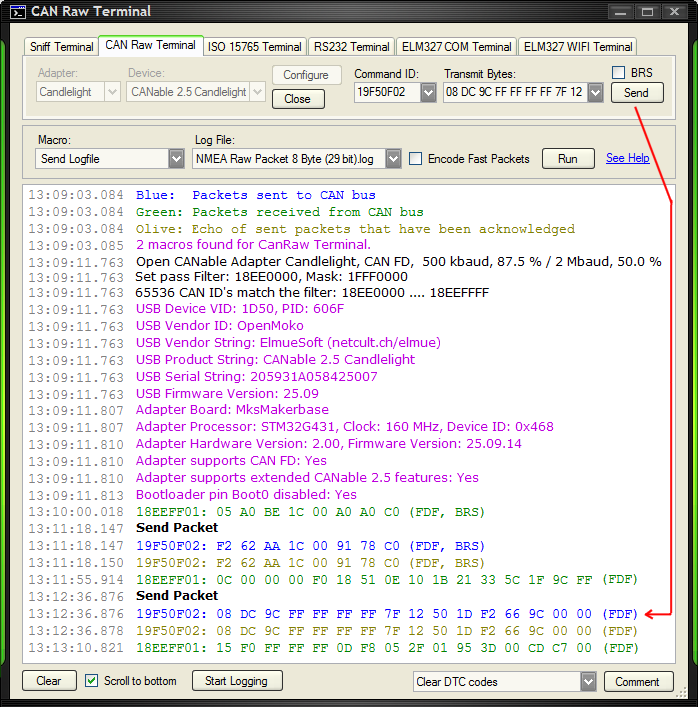
CAN Raw Terminal Show Full Size
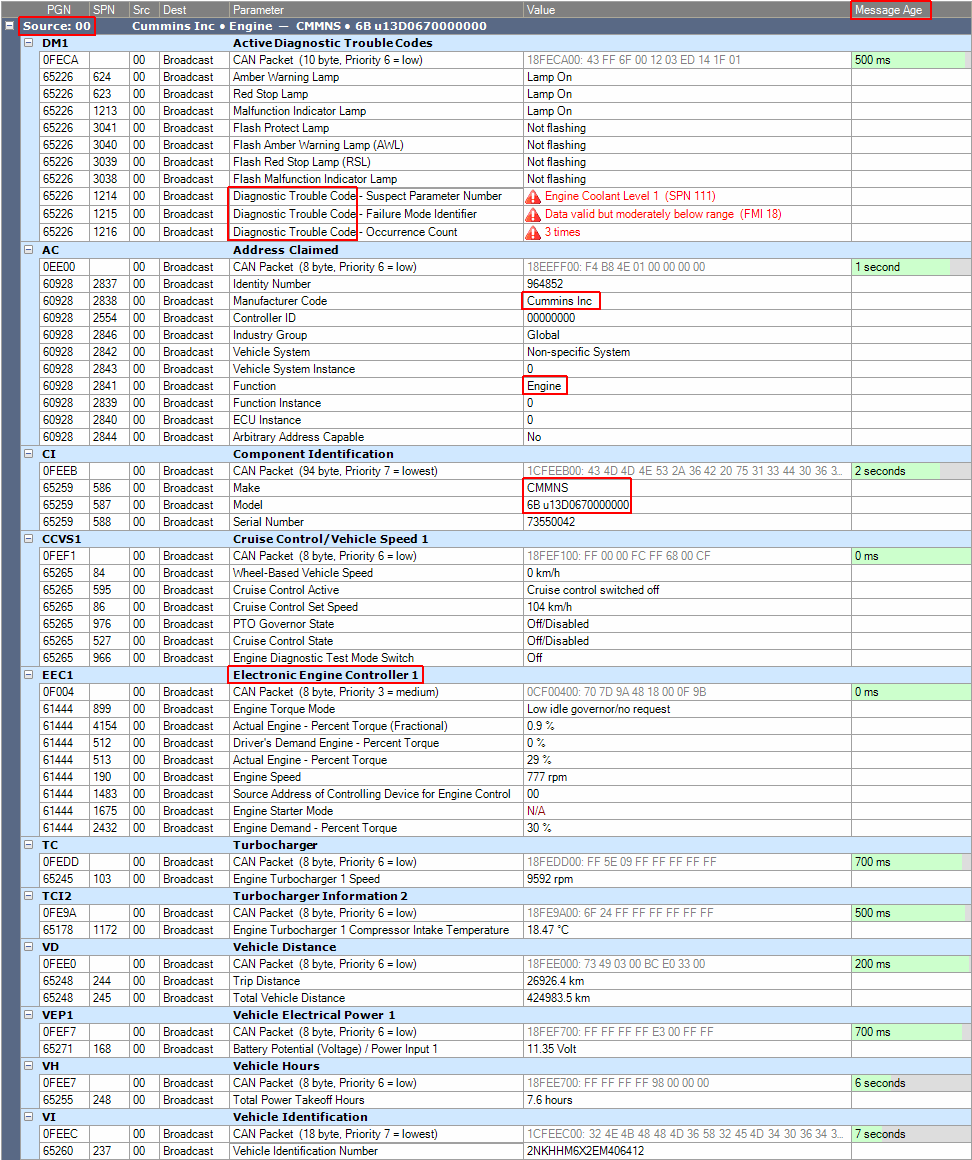
J1939 Protocol Show Full Size
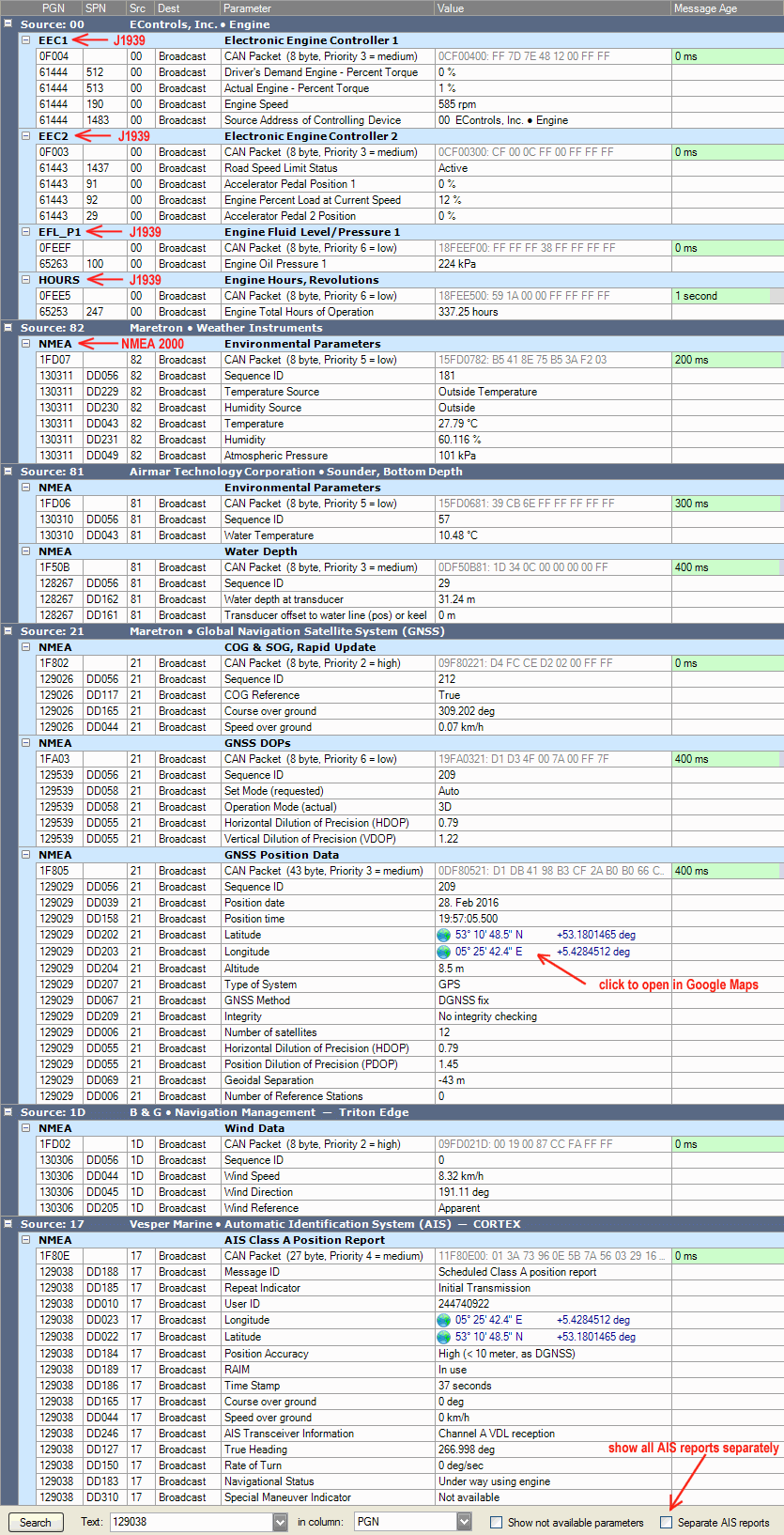
NMEA 2000 Protocol Show Full Size
HUD ECU Hacker is a powerful tool with lots of features, like the swiss knife for CAN bus and ECU's.
The CAN Raw Terminal allows you to see CAN bus traffic and send packets manually.
You can open multiple Terminal windows at once, one for each adapter.
You can also write
macro scripts that receive packets and send responses and
simulate any CAN controller.
You can grab logfiles from CAN bus traffic.
You can send all packets in a logfile to CAN bus.
The CAN Raw Terminal is designed to communicate with a device on CAN bus.
There is another Terminal, the Sniff Terminal which allows to sniff CAN bus traffic silently without interference.
In the Sniff Terminal packets are normally not ACKnowledged, the adapter works in Silent Mode .
But HUD ECU Hacker would not be very useful if it would only show the raw packets that are transferred over CAN bus.
HUD ECU Hacker can
decode the protocols
ISO 15765 ,
J1939 and
NMEA 2000 .
The
J1939 protocol is used in on-highway, construction, agriculture and forestry vehicles.
And if you provide a
DBC file HUD ECU Hacker can decode the CAN packets of any vehicle, like for example from your car.
CAN bus Settings
Here you can configure how HUD ECU Hacker connects to CAN bus.
Send always 8 data bytes
If you send classic packets with less than 8 bytes they are padded to 8 bytes,
while CAN FD packets are always padded to the next possible data length.
Show all packets on the bus
This checkbox turns off all filters and also the combobox "ID Length" is ignored.
No matter if you selected '11 Bit' or '29 Bit', you will see all packets on the bus.
Automatic Retransmission if no ACK received
If this checkbox is On the processor tries to send a packet until it is achnowledged.
After trying it 128 times in vain the processor goes into error state Bus Passive .
If the checkbox is Off the processor sends the packet in One shot mode .
If the packet is not acknowledged the processor does not send it again.
Show sent packets in Trace if ACK received
When a packet was acknowledeged you see the 'echo' of the Tx packet in olive color.
You see the exact timestamp when the packet has been acknowledged.
If the packet is not acknowledged you will not see any echo and the Tx LED does not flash.
This allows you to verify that a packet has been sent and received successfully.
The CANable 2.5 firmware is the first firmware where this is implemented correctly.
The legacy Slcan firmware did not implement this feature.
The legacy Candlelight firmware showed a fake echo , also for not acknowledged packets.
Suppress repeating identical CAN bus packets
CAN bus traffic is often very repetitive.
Here you can hide all packets that have already been shown with the same ID and data bytes.
You see each unique packet only once.
Host Filter
Filters are a new feature that was missing in the legacy firmware.
Host filters can drastically reduce the traffic over USB.
This is important because the USB speed is limited to 12 Mbit/s while CAN data may come with up to 10 Mbaud.
Only CAN IDs that match the filter will be sent over USB to the host.
The screenshot above shows a filter that lets only pass the CAN IDs from 18EE0000 to 18EEFFFF .
Please read the chapter about
CAN filters in the HUD ECU Hacker manual.
NOTE: The Rx LED flashes when a CAN packet is received. It also flashes for packets that are blocked by the filters.
This means that the Rx and Tx LEDs always show the entire CAN bus traffic, even if your filter blocks everything.
The STM32 processor does not allow to modify the host filters after the adapter has been opened.
The only exception is that a single filter can be replaced by another filter of the same type (11 / 29 bit).
CAN Bridge
An adapter with multiple CAN channels can be configured as CAN bridge.
From each CAN channel you can forward specific or all CAN IDs to another CAN channel.
The Host Filters (green) define which CAN IDs are sent over USB to the computer.
The Bridge Filters (red) define which CAN IDs are forwarded to another CAN channel.
The Bridge Pass Filters define a mask filter for CAN IDs to be forwarded.
The Bridge Block Filters define a mask filter for CAN IDs to be blocked.
Block filters have priority over pass filters.
You can define up to 20 bridge filters per channel (pass / block and 11 bit / 29 bit mixed).
Each bridge filter defines a destination channel.
It is allowed to modifiy bridge filters after opening the CAN channel.
Each bridge filter must be accessed individually by it's index between 0 and 19.
You must assign a different index to each filter that you set, otherwise you overwrite an existing filter.
Example 1:
A pass filter with Filter = 7E0 and Mask = 7F0 forwards all CAN IDs from 7E0 ... 7EF.
An additional block filter with Filter = 7E5 and Mask = 7FF blocks the single CAN ID 7E5.
Both filters combined forward the CAN IDs 7E0 ... 7E4 and 7E6 ... 7EF.
Example 2:
You want to forward all 11 bit CAN IDs from channel 0 to channel 1, except 7E8.
You define a pass-ALL filter for channel 0 with Filter = 000 and Mask = 000 and Destination Channel = 1.
You define a block filter for channel 0 with Filter = 7E8 and Mask = 7FF and Destination Channel = 1.
It is also possible to forward a received CAN packet to multiple other CAN channels simultaneously.
If no pass filters are defined the bridge mode is turned off.
If you want to reverse engineer an ECU that responds on CAN ID 7E8,
you connect the ECU to one channel and CAN bus to the other channel of a multi-channel adapter.
You set a bridge pass filter for all 11 bit CAN IDs.
You set a bridge block filter for the ECU's response ID 7E8.
You set a host filter for ID 7E8.
All ECU responses on ID 7E8 will now be sent to the computer instead of CAN bus.
In HUD ECU Hacker you write a macro script that manipulates the ECU response.
Finally the macro script sends your fake response back to CAN bus.
ATTENTION:
The origin channel and the destination channel must both be open.
Forwarded packets are sent to the host as Rx packets on the origin CAN channel on which they were received.
Forwarded packets do not generate a Tx echo on the destination CAN channel to which they are sent.
You can only forward from a CAN channel with higher baudrate to a slower channel if the traffic is not too high.
Only CAN FD packets with max. 8 data bytes are forwarded to a classic CAN channel.
Samplepoint & Baudrate
The samplepoint is not really important for classic CAN.
But if you plan to use CAN FD you must enter the correct samplepoints, otherwise you get bus errors
because on a CAN bus many controllers must synchronize to each other using the exactly same settings.
The correct samplepoints are absolutely crucial to connect to a CAN FD bus.
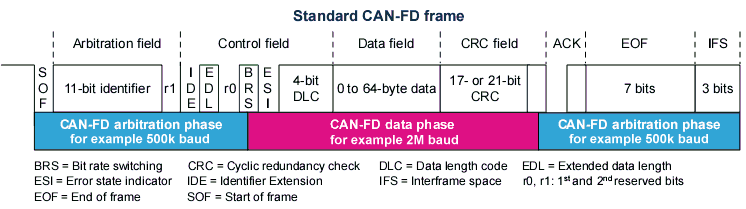
One bit of a CAN packet is sub-divided into multiple Time Quantums , in this example sixteen.
The samplepoint is the exact moment when the processor measures the state of the CAN bus: High or Low.
The samplepoint must be a fraction of 2 integers:
1/2 = 50% , 3/5 = 60% , 5/8 = 62.5% , 2/3 = 66.7% , 3/4 = 75% , 4/5 = 80% , 7/8 = 87.5%
A later samplepoint has the advantage that it allows longer cables, to compensate for the delay of distant controllers.
An earlier samplepoint has the advantage that it is more robust against cheap, unprecise oscillators and jitter.
But the major problem is that CAN FD switches the baudrate exactly at the samplepoint of the BRS bit.
If you did not enter the two samplepoints correctly you will not be able to communicate with a CAN FD bus.
The processor needs 3 settings to configure baudrate and samplepoint:
BitRate Prescaler
Segment1
Segment2
The STM32 processors treat the Synchronization segment separately. Therefore you must add 1 to Segment 1.
Example: CAN Clock = 160 MHz, Baudrate = 500 kBaud, Samplepoint = 75%, Time Quantums (TQ) per bit = 16.
This can be achieved by passing the following settings to the processor: Prescaler = 20 , Segment1 = 11 , Segment2 = 4 .
Baudrate = 160 MHz / 20 / (1 + 11 + 4 ) = 500 kbaud
Samplepoint = (1 + 11 ) / (1 + 11 + 4 ) = 0.75 = 75%
The legacy Slcan firmware gives poor options for the CAN FD baudrates: only 2 and 5 Mega baud.
The legacy Candlelight firmware can theoretically set any baudrate that is possible.
But for the calculation the host application must know the limits for the settings Prescaler, Segment1 and Segment2.
Every processor has a different range for these values.
The legacy Candlelight firmware reports wrong limits and so a correct calculation is impossible.
Summary: With none of the legacy firmware's can you set a precise baudrate/samplepoint as needed.
My firmware gives you all the information that you need: the CAN clock and the maximum values for BRP, Seg1, Seg2.
See Slcan
command 'V' and the Candlelight structs
kCapabilityClassic and
kCapabilityFD.
Another wrong design in the legacy firmware is to use a CAN clock of 170 Mhz .
It is not possible to derive baudrates like 2, 4, 5 or 8 Mbaud with 50%, 62.5%, 75% or 87.5% samplepoint from 170 Mhz.
Therefore the new CANable 2.5 firmware changes the CAN clock to 160 MHz .
It is recommended by ST Microelectronics that the nominal and the data baudrate use the same prescaler .
The baudrate is switched exactly at the samplepoint of the BRS bit.
If the baudrates do not use the same prescaler, a phase shift will be the consequence which may corrupt the timing.
Another recommendation is that the prescaler should be as low as possible.
This results in a shorter TQ and allows finer adjustement to phase shifts.
CAN controllers synchronize on received edges from recessive to dominant.
The SJW defines the maximum deviation of a signal edge that the processor still allows for re-synchronization.
The TQ defines the minimum step at which the processor can adjust to the incoming signal edge.
And it is recommended that the Synchronization Jump Width should be: SJW = min(Segment1, Segment2).
For more details read the PDF documents in subfolder
Documentation .
All this baudrate / samplepoint stuff is really complicated and I have found many bugs in legacy code, so I implemented a check.
The host application sends the values for Prescaler, Segment 1 + 2 for the nominal and the data baudrate to the firmware.
And the firmware calculates the exact values and reports them in a debug message back to the host application.
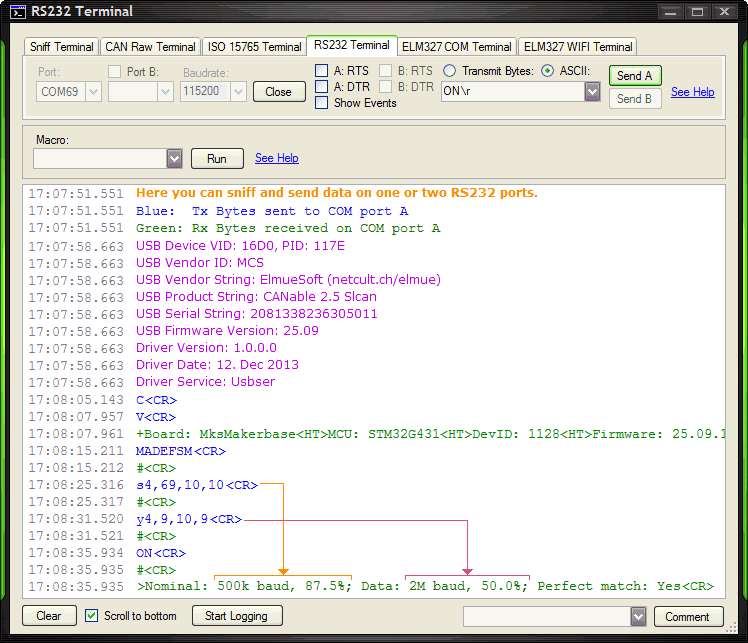
When you open the adapter you see this debug message from the firmware:
Nominal: 500k baud, 87.5%; Data: 2M baud, 75.0%; Perfect match: Yes
When you see Perfect Match: Yes , this means that Nominal and Data use the same prescaler as recommended.
ATTENTION:
To achieve the above settings multiple calculations are possible, for example:
Nominal = [Prescaler:2, Seg1:139, Seg2:20, SJW:20] and Data = [Prescaler:2, Seg1:29, Seg2:10, SJW:10]
Nominal = [Prescaler:10, Seg1:27, Seg2:4, SJW:4] and Data = [Prescaler:10, Seg1:5, Seg2:2, SJW:2]
With both examples you get the same baudrates and samplpoints.
But the first example works while the second produces Bus Off errors when sending packets with BRS!
Always chose the smallest possible prescaler which gives a finer granularity for resynchronization.
You don't have to care about this math stuff if you let HUD ECU Hacker find the best values for you.
HUD ECU Hacker implements a complex algorithm that calculates these values automatically.
You simply enter baudrates and samplepoints and click 'Save' (see
screenshot ).
If a samplepoint cannot be matched exactly, it shows a warning and uses the nearest value that is possible.
If a baudrate cannot be matched it shows an error .
CAN Hardware
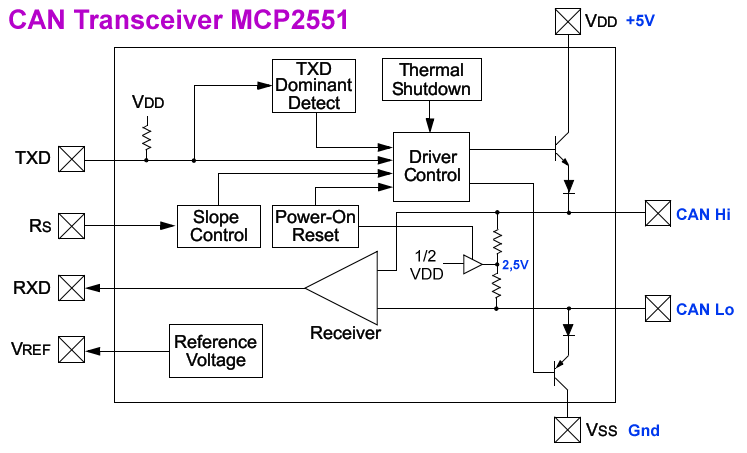
CAN bus uses 2 wires, CAN Hi and CAN Lo which transmit the opposite voltage.
The receiver calculates the difference between both wires which eliminates superimposed electrical interferences.
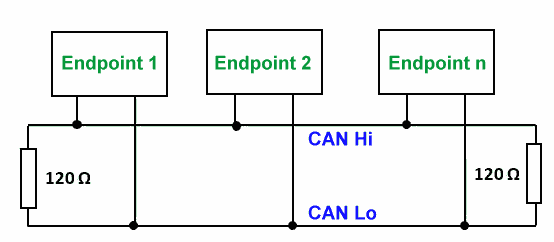
To both ends of a CAN bus cable there must be a 120 Ohm termination resistor connected to avoid reflections.
The neutral voltage on CAN bus is 2.5 Volt, which is the recessive state.
The transceiver chip pulls CAN Hi up and CAN Lo down over 2 transistors to transmit the dominant state.
In the dominant state CAN Lo has approx. 1.5 Volt and CAN Hi has 3.5 Volt.
Termination Show Full Size
Transceiver Chip Show Full Size
CAN bus Errors
There are 2 types of CAN bus errors:
No ACK Received
When a packet is sent to CAN bus it must be acknowledged by at least one other controller on the bus.
At the end of a packet there is the ACK bit that the receiver sets to dominant if the packet was received correctly.
The receiving processor calculates the
CRC of all bits and compares it with the CRC in the packet.
If there is no error it will set the ACK bit to inform the sender that the packet was received successfully.
As calculating the CRC and setting the ACK bit must happen within a few nanoseconds, this must be implemented in hardware .
If a packet is sent to a CAN bus with multiple controllers they will all set the ACK bit at the same time.
It is important to understand that setting the ACK bit does not depend on the CAN ID or the packet content.
Even if a controller is not interested in the received packet, it will set the ACK bit anyway.
On a correctly working CAN bus all packets will always be acknowledged by all receivers at the same time.
But if there is electrical interference (like a spike) on the CAN cable that disturbs one or more bits, the packet is not acknowledged.
In this case the transmitting CAN controller detects that the ACK bit was not set and it has to send the packet again.
Data Corruption
While a CAN controller is transmitting a packet, it permanently monitors the voltage of each bit on the bus.
If the sender tries to send a recessive bit, but detects a dominant state on the bus, it has detected data collision.
This means that another controller is sending at the same time. The transmission will be aborted immediately.
If this happens in the arbitration phase it is not an error.
The CAN ID with the higher priority will win the arbitration and the other controller must send the packet later again.
But if this happens in the data phase it is a severe error because only one controller can send data at the same time.
This may happen if a controller is configured for a wrong baudrate or a wrong CAN FD samplepoint.
If the sending controller detects such a severe error it goes into Bus Off state, it turns off it's transmitter permanently.
Also on the receiving side data corruption can be detected if bits that must always be High or Low have the wrong state.
The receiver may also detect invalid stuff bits that are inserted into the data stream after 4 or 5 consecutive bits of the same value.
All this error detection is implemented in hardware , this avoids that a buggy firmware can corrupt the entire CAN communcation.
The legacy Slcan firmware had no error reporting at all.
When you have sent a packet to the legacy firmware you had no idea if the packet was really sent to the bus or not.
After sending an invalid parameter, for example when setting the baudrate, you had no idea why you could not connect to CAN bus.
And the legacy Candlelight firmware had an error reporting, but only for CAN bus errors and there were many issues.
The legacy firmware was written by sloppy programmers.
I fixed this and implemented a proper error reporting for CAN bus errors and also for command errors.
With the new firmware it will never again happen that something does not work and you have no idea why.
The first CAN bus error is always reported immediately.
A second error is only reported after 100 ms have elapsed and only if the second error is different from the
previously reported. This is important to avoid flooding the host with thousands of errors as the legacy firmware did.
If the same error stays present for a long time, it is reported again in intervals of 3 seconds .
21:20:14.788 Send Packet 21:20:14.788 18EEFF01: 01 02 03 04 05 06 07 08 <—— this packet was sent successfully 21:20:14.790 18EEFF01: 01 02 03 04 05 06 07 08 <—— this is the Tx echo 21:20:18.119 Send Packet <—— send with auto-retransmission ON 21:20:18.119 14A90022: 01 02 03 04 05 06 07 08 <—— this packet was not acknowledged 21:20:18.120 Bus Active, Tx Errors: 8 <—— first error immediately 21:20:18.220 Bus Passive, No ACK received, Tx Errors: 128 <—— second error after 100 ms 21:20:18.738 Send Packet 21:20:18.738 14A90022: 01 02 03 04 05 06 07 08 <—— this packet was not acknowledged 21:20:21.216 Bus Passive, No ACK received, Tx Errors: 128 21:20:24.212 Bus Passive, No ACK received, Tx Errors: 128 <—— same error repeated every 3 seconds 21:20:27.208 Bus Passive, No ACK received, Tx Errors: 128
All controllers on CAN bus share the same two data wires.
If only one controller has a bug and breaks the rules of CAN bus, it will screw up the traffic of all the others.
Thefore it is fundamentally important that a controller turns off it's transmitter, when it has detected a problem.
This error detection must be implemented in hardware . It must be immediate and bullet proof.
Therefore all processors that have a CAN bus controller distinguish these 4 states:
Bus Actice
Warning Level (between 96 and 128 errors, if no ACK received)
Bus Passive (between 128 and 248 errors, if no ACK received)
Bus Off (more than 248 errors, if data collision detected)
In the arbitration phase it is allowed that multiple controllers send at the same time. One of them will win the arbitration.
But in the data phase there must be only one controller sending data.
If the processor detects a case of a severe data corruption it immediately stops transmitting and goes into Bus Off state.
Bus Off is a severe error that you can create by sending packets between two adapters configured for different baudrates.
22:21:24.187 Send Packet 22:21:24.187 170AA3CB: 01 02 03 04 05 06 07 08 22:21:24.623 Bus Passive, Bit stuffing error, Tx Errors: 128, Rx Errors: 8 <—— corruption while sending 22:21:27.618 Bus Passive, Recessive bit error, Tx Errors: 128, Rx Errors: 8 22:21:30.367 Bus Off, Frame format error, Tx Errors: 248, Rx Errors: 127 <—— corrupt packet received
With a little experience you can deduce what is wrong on CAN bus by understanding what these errors mean.
NOTE :terminated with at least one 120 Ohm resistor you will get Bus Off errors.
If there is a severe error like Bus Off of Buffer Overflow, the Rx and Tx LED's are permanently On.
Transmit Timeout
If automatic retransmission is enabled and the processor does not receive an ACK it goes into Tx Bus Passive state.
In this state the processor re-transmits the first packet in the Tx FIFO eternally creating 95% bus load .
The name 'Bus Passive ' is totally misleading . The bus is not passive. In the opposite it is flooded with traffic.
On the
oscilloscope you see the same packet retransmitted with nearly no pauses in between.
Therefore I implemented a Tx timeout. Pending Tx requests are cancelled after 500 ms .
You see an error report:
Bus Passive, Tx Timeout, No ACK received, Tx Errors: 128
The error counter stops counting at 128, but without a timeout there may be thousands of failed transmit attempts.
Transmit Echo Markers
The legacy Slcan firmware never gave you any feedback if a packet was sent or not.
The legacy Candlelight firmware had a wrongly designed feedback mechanism for Tx packets:
When the firmware received a Tx packet it has sent the entire Tx packet in a fake echo event back to the host.
This feedback was immediate, no matter if the packet was really sent to CAN bus or not.
For a CAN FD packet with 8 data bytes the firmware sent a fake event of 80 bytes over USB back to the host.
These fake events produced a lot of useless USB traffic , could not be turned off and the timestamps were wrong.
The new firmware can receive an 8 bit marker with each transmit packet from the host application.
When the packet has been sent successfully to CAN bus the processor fires a Tx Event that contains the marker.
The host application must store the last sent packets in an internal array (study the code of the
Demo Application ).
The maximum count of packets that can be stored in the adapter is 64 + 3 = 67.
The 8 bit marker can have values from 0x01 to 0xFF which is more than enough to give each Tx packet a unique marker.
The advantage is that the user has a reliable feedback which packets have really been sent.
In One-Shot mode (no re-transmission) this is the only way to know if a packet has been acknowledged or not.
The user also gets the exact timestamp when the packet has been dispatched to CAN bus.
By using markers
only one byte is transferred back to the host, rather than the entire packet (See
example ).
You can also decide on a per-packet basis if you want to receive an echo or not.
You will receive no echo event if you send a packet with a marker value of 0x00.
Timestamps
I have seen Slcan firmware that sends timestamps over USB to the host application.
A 32 bit timestamp is sent as 8 ASCII characters with each received packet.
Using an ASCII protocol is already inefficient. See
Comparison .
But making USB traffic even slower by inflating each packet with 8 additional bytes is a bad idea.
The CANable 2.5 firmware is speed optimized to the maximum that is possible.
Therefore timestamps are not implemented for Slcan , by purpose.
The Candlelight 2.5 firmware supports timestamps with 1 µs precision.
These occupy only 4 bytes and can be turned off.
This 64 bit counter has a precision of nanoseconds.
When a packet arrives over USB you attach a timestamp to it.
The
Demo Applications show both: How to use timestamps from firmware and from performance counter.
Timing - Round Trip Delay
The timing depends on many factors like computer speed, operating system, CPU load, CAN baudrate,
CAN or CAN FD protocol, 11 or 29 bit ID, amount of data bytes, ElmüSoft or legacy protocol.
The following is an example for CAN classic, 500 kBaud, 11 bit ID, 8 data bytes, ElmüSoft protocol:
Show Full Size
Sending a packet from sender to receiver takes approx. 80 + 35 + 10 + 240 + 10 + 35 + 80 = 490 µs.
The sender receives it's echo at the same time as the receiver gets the Rx packet.
Enter DFU mode
The new Slcan and the new Candlelight firmware have a new command to enter DFU mode.
The boot mode jumper will not be required anymore.
Before entering boot mode the firmware enables the pin BOOT0 if it was disabled.
If the pin BOOT0 was disabled the processor will not enter boot mode before it receives a hardware reset .
This means the user must reconnect the USB cable . This is only required if the pin BOOT0 was disabled before.
Other than the legacy firmware, the new firmware waits a delay of 300 ms before entering boot mode.
This guarantees that always a feedback is sent back to the host telling if the command was successful or not.
Multi-Channel Adapters
The new CANable 2.5 firmware supports multiple CAN channels provided for example by the STM32G473 processor.
The new ElmüSoft Candlelight protocol transfers each CAN channel over a separate USB interface.
In Device Manager you see one Candlelight USB interface per CAN channel.
For compatibility with legacy software the DFU interface must stay the second interface.
The operating system treats each CAN channel in the multi-channel adapter as if it was a separate adapter.
On Windows you can open each interface individually, even from different applications.
On Linux you access each SocketCAN device can0, can1,... individually.
The legacy Geschwister Schneider protocol uses only the first USB interface and ignores the others.
Instead it addresses the CAN channel via kHostFrameLegacy.channel.
On endpoint 0 the channel number is transmitted in Setup.wValue.
CAN channel Control Requests Packets via ElmüSoft Packets via Legacy 1 Setup.wValue = 0 USB interface 0 USB interface 0 2 Setup.wValue = 1 USB interface 2 USB interface 0 3 Setup.wValue = 2 USB interface 3 USB interface 0
The Slcan firmware prepends a '&' character before each command/response for CAN channel 2 and a '$' for channel 3.
ATTENTION:
The Full Speed USB transfer with 12 Mbit/s is the bottleneck of the CANable adapter.
If you have a busy CAN FD bus with a high baudrate you may already get buffer overflows while using only one CAN channel.
Transferring multiple CAN channels over one USB cable is only possible for CAN busses with low traffic / low baudrates.
It is recommended to transfer 2 high-traffic CAN busses over 2 single-channel adapters instead of one dual-channel adapter.
Read / Write Flash Memory
You can permanently store your own data in the flash memory of the processor.
Behind the firmware there is a lot of unused space available.
The STM32Gxxx processors have flash memory sizes between 32 kB and 512 kB organized in sectors of 2 kB.
Each 2 kB flash sector (0x800 bytes) can be erased and written individually. This takes 22 ms.
In each unused sector you can store any binary data from 1 byte up to 2000 bytes.
The firmware stores also the length of your data, so when reading you get back exactly what you have written before.
While the firmware is at the begin of the flash memory, the user data is stored at the end in descending order.
User Data Segment 00 is in the last flash memoy sector.
This avoids that the user data gets corrupted when you update to a bigger firmware some day.
Example for 4 user segments stored in a 128 kB flash memory:
Sector Start Address End Address Size Content 0 0x08000000 0x080007FF 2kB Firmware etc... 17 0x08008800 0x08008FFF 2kB 18 0x08009000 0x080097FF 2kB unused etc... 59 0x0801D800 0x0801DFFF 2kB 60 0x0801E000 0x0801E7FF 2kB User Data Segment 03 61 0x0801E800 0x0801EFFF 2kB User Data Segment 02 62 0x0801F000 0x0801F7FF 2kB User Data Segment 01 63 0x0801F800 0x0801FFFF 2kB User Data Segment 00
If the processor has 128 kB flash and the firmware occupies 35 kB you have 46 flash segments available.
When you write to a flash segment the firmware first checks if the segment already contains identical data.
Only if you write different data the segment is erased and the new data is written.
This avoids that the flash memory is wearing off when your application writes the same data over and over again.
The firmware also prevents that you can accidentally overwrite a sector that is occupied by firmware.
Slcan : Use commands "*Flash:XX=Data" and "*Flash:XX?"
Bus Load
The new firmware can calculate the bus load . It is displayed in percent in an interval that the user can define.
If the interval is for example 5 seconds, the bus load is calculated as the average of 5 seconds.
HUD ECU Hacker shows the bus load above in the CAN Raw Terminal and once per second in the Trace pane, if it is not zero.
The calculation is not precise because stuffing bits are only estimated. It may deviate by +/- 10%.
Transceiver Delay
The delay of the CAN bus transceiver chip is relevant for baudrates above 1 Mega baud.
The processor automatically measures the delay and the firmware reports it.
You see a debug message after the first CAN FD packet that you send with the BRS flag set:
23:32:21.069 19858A01: 0C 00 00 00 F0 18 51 0E (FDF, BRS) 23:32:21.073 Measured transceiver chip delay: 131 ns 23:32:21.073 19858A01: 0C 00 00 00 F0 18 51 0E (FDF, BRS)
Normally transceiver chips have a delay around 50 ns.
But the isolated chip in the MKS Makerbase that you see here is slower. (
Datasheet ).
This delay is no problem at all because the processor measures and compensates it automatically.
Bugfixes
I fixed several bugs in the legacy firmware:
The Candlelight firmware could crash completely after a buffer overflow.
Candlelight had a severe misdesign: it used only one buffer for CAN Rx and Tx.
The consequence was that after a CAN buffer overflow it could not even send the error status to the host.
Candlelight did not send USB traffic correctly. USB Packets with exactly 64 bytes arrived crippled.
These are only 3 examples of the worst bugs. All bugfixes are documented in the sourcecode.
2.) Application Developer Manual - Slcan
The Slcan firmware generates a USB CDC interface which appears as a COM port on Windows and as ttyACM device on Linux.
All commands and responses are sent as
ASCII strings which is slow. See
Comparison .
For professional applications use Candlelight and not Slcan.
Slcan is case sensitive . The first character is the command, the last character is a carriage return.
Slcan Commands
Command Condition Version Meaning Comment "A1\r" Closed legacy Enable Auto Retransmission Retransmit packets until they are acknowledged "A0\r" Closed legacy Disable Auto Retransmission Enable one shot mode "C\r" Open/Closed legacy Close the adapter Shut down CAN connection, reset to default settings "L7\r" Open/Closed 100 Enable bus load reports every 700 ms
L1: Report interval= 100 ms, L50: Interval= 5 seconds
Valid range of interval: 0 ... 100 (max 10 seconds)
"L0\r" Open/Closed 100 Disable bus load reports "O\r" Closed legacy Open adapter Connect to CAN bus with the mode set by M0 / M1 "ON\r" Closed 100 Open in normal mode Ignore settings with M0 / M1 "OS\r" Closed 100 Open in silent mode Ignore settings with M0 / M1 "OI\r" Closed 100 Open in internal loopback mode Ignore settings with M0 / M1 "OE\r" Closed 100 Open in external loopback mode Ignore settings with M0 / M1 "V\r" Open/Closed legacy Return detailed info: Version/Board/MCU/Limits Returns multiple key/value pairs. See Version Info Set Modes Condition Version Meaning Comment "M1\r" Closed legacy Enable silent mode The next command "O\r" will open in bus monitoring mode "M0\r" Closed legacy Disable silent mode The next command "O\r" will open in normal mode "MA\r" Closed 100 Enable Auto Retransmission mode (same as A1) Retransmit packets until they are acknowledged "Ma\r" Closed 100 Disable Auto Retransmission mode (same as A0) Enable one-shot mode "MD\r" Open/Closed 100 Enable Debug Messages Firmware sends string messages to the host "Md\r" Open/Closed 100 Disable Debug Messages Do not send debug messages "ME\r" Open/Closed 100 Enable CAN Error reports CAN errors are sent to the host "Me\r" Open/Closed 100 Disable CAN Error reports CAN error reporting is off (deprecated!) "MF\r" Open/Closed 100 Enable advanced Feedback mode Detailed error feedback is sent (see next table ) "Mf\r" Open/Closed 100 Enable legacy Feedback mode Legacy Feedback is sent (CR / BEL) "MI\r" Open/Closed 100 Enable Identify mode The Rx/Tx LED's start blinking "Mi\r" Open/Closed 100 Disable Identify mode The Rx/Tx LED's stop blinking "MM\r" Open/Closed 100 Enable Tx echo report marker Report all successfully sent packets with a marker "Mm\r" Open/Closed 100 Disable Tx echo report marker No Tx Echo report (also Tx marker = 00 sends no echo) "MR\r" Open/Closed 100 Enable 120 Ω Termination Resistor Supported only by few boards "Mr\r" Open/Closed 100 Disable 120 Ω Termination Resistor "MS\r" Open/Closed 100 Enable ESI report Report the ESI flag of received CAN FD messages "Ms\r" Open/Closed 100 Disable ESI report No ESI report "MDEFMS\r" Open/Closed 100 Enable Debug, Error, Feedback, Echo, ESI reports You can set all modes at once in one command Set Baudrates Condition Version Meaning Comment "S0\r" Closed legacy Set nominal baudrate 10 kbaud Samplepoint 75% "S1\r" Closed legacy Set nominal baudrate 20 kbaud Samplepoint 75% "S2\r" Closed legacy Set nominal baudrate 50 kbaud Samplepoint 75% "S3\r" Closed legacy Set nominal baudrate 100 kbaud Samplepoint 75% "S4\r" Closed legacy Set nominal baudrate 125 kbaud Samplepoint 75% "S5\r" Closed legacy Set nominal baudrate 250 kbaud Samplepoint 75% "S6\r" Closed legacy Set nominal baudrate 500 kbaud Samplepoint 75% "S7\r" Closed legacy Set nominal baudrate 800 kbaud Samplepoint 75% (may not be precise) "S8\r" Closed legacy Set nominal baudrate 1 Mbaud Samplepoint 75% "S9\r" Closed legacy Set nominal baudrate 83.333 kbaud Samplepoint 75% "SA\r" Closed 103 Set nominal baudrate 75 kbaud Samplepoint 75% (may not be precise) "SB\r" Closed 103 Set nominal baudrate 62.5 kbaud Samplepoint 75% "SC\r" Closed 103 Set nominal baudrate 33.333 kbaud Samplepoint 75% "SD\r" Closed 103 Set nominal baudrate 5 kbaud Samplepoint 75% "Y0\r" Closed 100 Set CAN FD data baudrate 500 kbaud Samplepoint 75% deprecated "Y1\r" Closed 100 Set CAN FD data baudrate 1 Mbaud Samplepoint 75% deprecated "Y2\r" Closed legacy Set CAN FD data baudrate 2 Mbaud Samplepoint 75% deprecated "Y4\r" Closed 100 Set CAN FD data baudrate 4 Mbaud Samplepoint 75% deprecated "Y5\r" Closed legacy Set CAN FD data baudrate 5 Mbaud Samplepoint 75% deprecated "Y8\r" Closed 100 Set CAN FD data baudrate 8 Mbaud Samplepoint 50% (75% does not work) deprecated "s4,69,10,7\r" Closed 100 Set nominal bitrate: Prescaler=4, Set 500 kbaud, Samplepoint 87.5%Samplepoint "y4,9,10,7\r" Closed 100 Set data bitrate: Prescaler=4, Set 2 Mbaud, Samplepoint 50%Samplepoint Host Filters Condition Version Meaning Comment "F7E8,7FF\r" Closed 100 Host mask filter for only one ID: 7E8 (11 bit)
You can set up to 8 mask filters separated by semicolons.
11 bit and 29 bit filters can be mixed.
"F18DA00F1,1FFF00FF\r" Closed 100 Host mask filter for 256 IDs: 18DAXXF1 (29 bit) "F7E0,7F0;720,7F0;730,7F0\r" Closed 100 3 host filters for 16 IDs each: 7EX, 72X and 73X "f\r" Closed 100 Clear all host filters Remove all host filters Bridge Filters Condition Version Meaning Comment "F:P0A=7E0,7F0>1\r" Open/Closed 104 Set Pass filter Nº 0x0A = forward to channel 1 Forward CAN ID's 7E0 ... 7EF "F:B12=7E5,7FF>1\r" Open/Closed 104 Set Block filter Nº 0x12 = block on channel 1 Block CAN ID 7E5 "f:07\r" Open/Closed 104 Clear filter Nº 0x07 (Pass or Block) Remove current filter at index 7 "f:FF\r" Open/Closed 104 Clear all bridge filters Turn off bridge mode Special Commands Condition Version Meaning Comment "*Boot0:Off\r" Closed 100 Disable pin BOOT0 of STM32G4 xx processors See Hardware Misdesign "*Boot0:?\r" Open/Closed 100 Request status of pin BOOT0 returns "+1\r" if enabled or "+0\r" if disabled "*DFU\r" Open/Closed 100 Enable pin BOOT0 and enter DFU mode If feedback = FBK_ResetRequired: Reconnect USB cable! "*Flash:XX=Data\r" Open/Closed 102 Writes data to flash memory user segment XX "*Flash:00=48656C6C6F\r" writes "Hello" to segment 0 "*Flash:XX?\r" Open/Closed 102 Reads data from flash memory user segment XX "*Flash:00?\r" returns "+48656C6C6F\r" Transmit Packets Condition Version Meaning Comment "txxxxxxxxx\r" Open legacy Send classic packet with 11 bit ID Bits: None See Slcan Packets "Txxxxxxxxx\r" Open legacy Send classic packet with 29 bit ID Bits: IDE "rxxxxxxxxx\r" Open legacy Send Remote Transmission Request with 11 bit ID Bits: RTR "Rxxxxxxxxx\r" Open legacy Send Remote Transmission Request with 29 bit ID Bits: RTR + IDE "dxxxxxxxxx\r" Open legacy Send CAN FD packet, 11 bit, no baudrate switch Bits: FDF "Dxxxxxxxxx\r" Open legacy Send CAN FD packet, 29 bit, no baudrate switch Bits: FDF + IDE "bxxxxxxxxx\r" Open legacy Send CAN FD packet, 11 bit with baudrate switch Bits: FDF + BRS "Bxxxxxxxxx\r" Open legacy Send CAN FD packet, 29 bit with baudrate switch Bits: FDF + BRS + IDE CAN Channel Condition Version Meaning Comment "command\r" ---- legacy Destination is CAN channel 1 All adapters "&command\r" ---- 101 Destination is CAN channel 2 Only for multi-channel adapters "$command\r" ---- 101 Destination is CAN channel 3 Only for multi-channel adapters
ATTENTION: Do not use the commands S and Y for CAN FD. They do not allow to chose the correct samplepoint.
You can use them to make tests between 2 adapters on your desk, but not if you want to connect to a real CAN FD bus .
If you want to connect for example to a car that uses CAN FD, you MUST know the TWO samplepoints that the CAN bus uses.
Then you must calculate the Prescaler, Segment 1 and Segment 2 for the required baudrates and samplepoints and use commands s and y.
If you connect with wrong settings to a CAN FD bus you will get
Bus Passive or even
Bus Off errors. Read chapter
Baudrates .
Slcan Responses and Events
If advanced feedback mode has not been enabled with command MF the firmware operates in legacy feedback mode.
In legacy feedback mode the firmware returns a single character: Carriage Return (0x0D) for success or BEL (0x07) for error.
Legacy Feedback Version Meaning Comment "\r" (CR character) 105 The command has executed successfully Sent if advanced feedback mode is OFF "\x07" (BEL character) 105 The command has failed Sent if advanced feedback mode is OFF Advanced Feedback Version Meaning Comment "#\r" 100 The command has executed successfully Requires advanced feedback mode (MF) "#1\r" 100 The command is invalid Requires advanced feedback mode (MF) "#2\r" 100 A parameter of the command is invalid Requires advanced feedback mode (MF) "#3\r" 100 The command reqires the adapter to be open Requires advanced feedback mode (MF) "#4\r" 100 The command reqires the adapter to be closed Requires advanced feedback mode (MF) "#5\r" 100 The HAL from ST Microelectronics reported an error Requires advanced feedback mode (MF) "#6\r" 100 The feature is not supported by the board / not implemented Requires advanced feedback mode (MF) "#7\r" 100 The CAN Tx Buffer is full (no ACK received, 67 packets waiting) Requires advanced feedback mode (MF) "#8\r" 100 CAN bus is off (a severe CAN error has occurred) Requires advanced feedback mode (MF) "#9\r" 100 Sending packets is not possible in silent mode Requires advanced feedback mode (MF) "#:\r" 100 The required baudrate has not been set Requires advanced feedback mode (MF) "#;\r" 100 Programming the Option Bytes in flash memory failed Requires advanced feedback mode (MF) "#<\r" 100 Please reconnect the USB cable, a hardware reset is required Requires advanced feedback mode (MF) "#=\r" 102 A parameter is outside the valid range Requires advanced feedback mode (MF) Response Version Meaning Comment "+Text\r" 100 The firmware sends a plain text response to a command Used by commands "*Boot0:?\r" and "V\r" "+Hex Data\r" 102 The firmware sends a hex byte response to a command Used by command "*Flash:XX?\r" Event Version Meaning Comment ">Message\r" 100 The firmware sends a debug message (plain text) Requires Debug Messages to be enabled "Exxxxxxxx\r" 100 The firmware reports the CAN Error Status. See Slcan Errors Requires CAN Error Reports to be enabled "L27\r" 100 The firmware has calculated a bus load of 27%. Requires Bus Load Reports to be enabled "M3C\r" 100 The firmware reports the Tx echo marker 0x3C. See Slcan Packets Requires Tx Echo Report markers to be enabled Rx Packets Version Meaning Comment "txxxxxxxxx\r" legacy Received classic packet with 11 bit ID Bits: None See Slcan Packets "Txxxxxxxxx\r" legacy Received classic packet with 29 bit ID Bits: IDE "rxxxxxxxxx\r" legacy Received Remote Transmission Request with 11 bit ID Bits: RTR "Rxxxxxxxxx\r" legacy Received Remote Transmission Request with 29 bit ID Bits: RTR + IDE "dxxxxxxxxx\r" legacy Received CAN FD packet, 11 bit, no baudrate switch Bits: FDF "Dxxxxxxxxx\r" legacy Received CAN FD packet, 29 bit, no baudrate switch Bits: FDF + IDE "bxxxxxxxxx\r" legacy Received CAN FD packet, 11 bit with baudrate switch Bits: FDF + BRS "Bxxxxxxxxx\r" legacy Received CAN FD packet, 29 bit with baudrate switch Bits: FDF + BRS + IDE CAN Channel Version Meaning Comment "response\r" legacy Origin is CAN channel 1 All adapters "&response\r" 101 Origin is CAN channel 2 Only for multi-channel adapters "$response\r" 101 Origin is CAN channel 3 Only for multi-channel adapters
Slcan Version Info
In the new firmware the command "V\r" returns one string with multiple key/value pairs separatad by tab characters .
It starts with a plus character that indicates a command response with text content, rather than a feedback response (#).
+Board: Multiboard\t MCU: STM32G431\t DevID: 1128\t Firmware: 2427156\t Slcan: 103\t Clock: 160\t Channels: 1\t Quartz: No\t Limits: 512,256,128,128,32,32,16,16\t HAL: 1.2.5\t Serial: 206249E3946306550\r
Split this string at each tab character ('\t') and then each part at the colon. You get 7 key/value pairs:
Key Value Version Comment Board Multiboard 100
This defines for which board the firmware was compiled.
It may not match the real hardware if the user has uploaded the wrong firmware.
MCU STM32G431 100
This defines for which processor the firmware was compiled.
It may not match the real processor if the user has uploaded the wrong firmware.
DevID 1128 100
This is the "Device ID" of the real processor. Convert 1128 to hex and you get 0x468.
Each processor serie is identified by a unique "Device ID".
0x468 = Category 2 devices (STM32G431, STM32G441)
0x469 = Category 3 devices (STM32G471, STM32G473, STM32G474, STM32G483, STM32G484)
0x479 = Category 4 devices (STM32G491, STM32G4A1)
Firmware 2427156 100
The legacy firmware has returned completely meaningless version numbers like "ba6b1dd".
Here you get a version number that indicates the date when the firmware was created.
Convert to hex and you get the BCD version 0x250914, which means 14th september of 2025.
Slcan 103 100
This is the version of the Slcan module that you see in the tables above in column 'Version'.
Use the
Slcan Version to detect which features are available in the firmware.
Clock 160 100
The CAN clock is 160 MHz
Channels 1 101
The count of CAN channels (always 1, if not a multi-channel board).
Quartz No 101
'Yes' if the board has a quartz and the correct firmware has been uploaded.
'No' if the board has no quartz or the wrong firmware has been uploaded.
If the board has no quartz, the processor's RC oscillator with only 1% precision is used.
Limits 512,256,128,128, 100
These 8 values are the upper limits for the bitrate commands 's' and 'y'.
Each processor has different limits for Prescaler, Segment1, Segment2 and Synchr. Jump Width.
Nominal baudrate: max Prescaler= 512, max Seg1 = 256, max Seg2= 128, max SJW = 128
FD Data baudrate: max Prescaler= 32, max Seg1 = 32, max Seg2= 16, max SJW = 16
HAL 1.2.5 103
The version of the HAL (Hardware Abstraction Layer) that the firmware uses.
Serial 206249E3946306550 102
The serial number of the processor. STM guarantees that this is unique.
Slcan Packets
All packets are transmitted using this pattern:
Channel
Packet type
CAN ID
DLC
Classic packets: DLC = '0' to '8',
CAN FD: '8'= 8 byte, '9'= 12 bytes, 'A'= 16 bytes, 'B'= 20 byte, 'C'= 24 bytes, 'D'= 32 bytes, 'E'= 48 byte, 'F'= 64 byte.
Data bytes
only for Rx packets and only if ESI
only for Tx packets and only if Tx Echo Markers
The marker in the Tx packet must be > 0 otherwise no echo is sent.
Direction Packet Slcan Comment Both 18AABBCC: 11 22 33 44 55 "T 18AABBCC 5 1122334455 \r" Classic, 29 bit ID Both 7E0: 11 22 33 44 55 66 77 88 99 AA BB CC "d 7E0 9 112233445566778899AABBCC \r" CAN FD, 11 bit, FDF Receive 7E0: 11 22 33 44 55 66 77 88 "b 7E0 8 1122334455667788 S \r" FDF, BRS, ESI Transmit 7E0: 11 22 33 44 55 66 "t 7E0 6 112233445566 3F \r" Marker = 3F (00 = no echo) Both 101: AA BB CC DD EE FF "t 101 6 AABBCCDDEEFF \r" CAN channel 1 Both 101: AA BB CC DD EE FF "& t 101 6 AABBCCDDEEFF \r" CAN channel 2 Both 101: AA BB CC DD EE FF "$ t 101 6 AABBCCDDEEFF \r" CAN channel 3
ATTENTION: If there are any additional characters behind the packet data, this is a syntax error.
Example:
Tx: "t7E061122334455663F\r" <—— send packet with marker 3F Rx: "#\r" <—— receive command feedback (Success) Rx: "M3F\r" <—— receive echo marker 3F
Slcan Error Reports
When CAN Error Reports are enabled you get an error report only if at least one error is present.
Errors are sent immediately, after 100 ms or after 3 seconds as explained
above .
An error report is always of the form "Exxxxxxxx\r" and consists of 5 parts:
Digit Meaning Value 1 Bus Status
'0' = Bus Active
'1' = Warning Level
'2' = Bus Passive
'3' = Bus Off
2 Last Protocol Error
'0' = None
'1' = Bit stuffing error
'2' = Frame format error
'3' = No ACK received
'4' = Recessive bit error
'5' = Dominant bit error
'6' = CRC error
3 + 4 Firmware Error Flags
0x00 = None
0x01 = Rx Failed
0x02 = Tx Failed
0x04 = CAN Tx buffer overflow
0x08 = USB IN buffer overflow
0x10 = Tx Timeout
Multiple flags may be combined
5 + 6 Tx Error Count 0 ... 255 errors 7 + 8 Rx Error Count 0 ... 255 errors
Example: "E2 3 10 80 0C \r" means:
Bus is passive, No ACK received, Tx Timeout, 128 Tx Errors, 12 Rx Errors
Slcan Initialization
When connecting to a CANable 2.5 adapter you should follow this sequence:
Send command "\rC\r" to close the device if it is till open.
But this command has also another purpose: It resets all internal variables in the firmware to their default.
Baudrates and all modes are reset (back to legacy), reports turned off, filters removed, Rx/Tx buffers are emptied.
ATTENTION: The command 'Close' is the only command that does not send a feedback , although feedbacks are enabled.
The purpose is that you can always send this as the first command and don't have to wait for a feedback.
When you connect to a CANable you don't know if the user has connected a legacy device or a CANable 2.5
Additionally the firmware cannot know at this moment if you will enable feedback mode later or not.
Therefore the command 'Close' behaves exactly as the legacy command: It never sends a feedback.
Split the response string at the tab characters .
When you get 7 parts or more you are communicating with a CANable 2.5, otherwise it is a legacy firmware.
If you don't support legacy devices show an error message, otherwise switch to legacy mode.
If it is a CANable 2.5 use the Slcan Version Number (100 or higher) to check which features are available.
Send command "MF\r" to enable feedback mode (or "MADEFMS\r" with all the other modes that you need)
This will be the first command that sends a feedback.
From now on you must wait for the feedback "#\r" and check for errors before sending the next command.
Send command 'S' or 's' to set the
nominal baudrate .
If you also send command 'Y' or 'y' to set the data baudrate , the firmware will switch automatically into CAN FD mode.
Finally execute command "ON\r" to open the device in normal mode.
RS232 Terminal Show Full Size
Here you see the initialization sequence sent manually to the adapter.
Use the RS232 Terminal in HUD ECU Hacker.
The baudrate that you enter to open the COM port is irrelevant.
The port runs always with maximum USB speed (12 MBit).
3.) Application Developer Manual - Candlelight
The Candlelight firmware generates one CAN FD interface for each CAN channel and a DFU firmware update interface.
Windows installs the WinUSB driver automatically. On Linux the device appears as SocketCAN: can0, can1,...
The Candlelight 2.5 firmware can be used to build professional high speed CAN FD applications.
Controlling the Candlelight firmware is more complex than the Slcan firmware.
There are lots of structures and enums. Explaining them all here would explode this manual.
Demo Applications
Therefore I wrote several open-source demo applications:
OS Demo App USB Library Comment Windows C# WinUSB Tested on Windows 7 to 11 Windows C++ WinUSB Tested on Windows 7 to 11 Windows Python WinUSB Tested on Windows with Python 3.8 Linux C++ libusb 1.0.30 Tested on Fedora 44 Linux Python libusb 1.0.30 Tested on Fedora with Python 3.14
These contain ready-to-use Candlelight classes that you copy to easily write your own CAN bus software.
They implement and demonstrate all firmware features of the new ElmüSoft Candlelight protocol :
Detect and enumerate all connected Candlelight devices
Obtain details about the connected device: USB descriptor, board, processor, version numbers,.....
Set baudrate and samplepoint
Set host filters / set bridge filters
Open / Close / Start / Reset / Identify / Busload Reports
Send packet / Send blob / Receive packet / Receive blob / Process Tx echo marker
Decode and display CAN bus errors
Use of multiple CAN channels
Disable pin BOOT0 / Enter DFU mode
Write and read user data to the flash memory
The
source code is full of
detailed comments so you can easily understand how it works.
The Windows code also shows how to use WinUSB correctly which is more complex than it seems at the first look.
For example in Cangaroo and in Candle.NET they use WinUSB wrongly which results in packet loss or wrong packet order.
WinUSB requires an unusal programming that is not documented by Microsoft.
The output of the C++ and C# and Python demo applications looks identical:
This screenshot uses timestamps from the computer CPU with 1 µs precision.
When you set the flag GS_DevFlagTimestamp the demo switches to firmware timestamps generated in the adapter.
They have no advantage at all. They produce more USB traffic and you will see several lines with "No Timestamp" .
The reason is that firmware timestamps are only available for events received from the firmware.
But when you send a packet to the firmware you don't get a timestamp.
Enter DFU mode
A SETUP request with DFU_Detach to interface 1 (DFU) enables boot mode.
Then immediately send a SETUP request with DFU_GetStatus to check if execution was successful.
If the state is DfuState_AppIdle the adapter will enter boot mode 300 ms later.
If the state is DfuState_AppDetach you must show a message to the user to reconnect the USB cable.
The USB reconnection is only required if the pin BOOT0 was disabled before.
The demo application shows the entire procedure.
See
DFU Functional Descriptor 1.1.pdf and
ST - AN3156 - DFU Bootloader Requests.pdf in subfolder
Documentation .
4.) Firmware Developer Manual
This is the first project that unites two firmware's, written by different persons, into one project.
The new CANable 2.5 firmware uses the same code base to compile Slcan and Candlelight.
The CAN interface, error handling, LED control, entering DFU mode, etc... use common code.
Only the USB interface and the command executer are implemented individually.
Each project has an own Make file that inculdes the corresponding subfolder: Slcan or Candlelight.
Caveat
The code in this project is not for beginners.
You need several years of embedded C programming experience and hardware knowledge.
Adding new boards
In the file settings.h you find the definitions for the boards.
Currently there are the pin definitions for the boards from MKS Makerbase and Openlight Labs.
The new board must be defined in a new Make file as TARGET_BOARD
Adding new processors
Also in settings.h are the includes of the HAL files (Hardware Abtraction Layer) from ST Microelectronics.
For another processor serie the required HAL files must be added into a new subfolder.
The new processor must be defined in a new Make file as TARGET_MCU
Adding new quartz crystals
The cheap adapters have no quartz on board. They use the unprecise RC oscillator in the processor.
The Jhoinrch firmware is configured to use a 25 MHz quartz.
For another quartz frequency, create a new make file, set QUARTZ_FREQU and adapt system.c
USB Interface
The USB interface is by far the most complicated code in the firmware.
ST Microelectronics gives us a HAL that is scatterd over eleven files calling from one file into another.
All the USB stuff is called from multiple interrupt handlers.
If you don't know what is a SETUP request , what is an OUT endpoint or what stalling an endpoint means,
I recommend that you read the exellent
USB tutorial in subfolder
Documentation .
Firmware Upload on Linux
Install the DFU Util: sudo apt install dfu-util
Flash the new firmware: sudo dfu-util -w -c 1 -i 0 -a 0 -D "STM32G431 - Candlelight2.5 - Multiboard.dfu"
ATTENTION: On Linux it is not possible to upload the new firmware to a factory default WeActStudio v1 adapter.
Firmware Upload on Windows
When you install the latest HUD ECU Hacker you always get the latest DFU firmware files.
If HUD ECU Hacker is already installed you can also download the correct
DFU file and save it to
C:\Program Files (x86)\HUD ECU Hacker\Driver\CANable Firmware Update\Firmware
Compiling Firmware on Linux
Install the ARM compiler: sudo apt install build-essential gcc-arm-none-eabi
You can use GNU tools for STM32 version 10.3.1 or higher.
To compile the firmware, type at the root directory level: make -s -f Build/Make_G431_Candle_Multiboard
The compiler generates a BIN, HEX and ELF file.
The make file contains a command (dfu-util ) that automatically uploads the compiled firmware to the CANable.
Compiling Firmware on Windows
You find a lot of instructions in internet how to compile the firmware on Linux.
But there is nothing for Windows developers, although it is quite simple.
Cube Programmer
If you think that you can install the STM32 Cube Programmer from ST Microelectronics
and you will get a comfortable developer environment, you are completely wrong!
After installing this monster of 2 Gigabyte you will find a very badly designed user interface,
an eternally slow Java software and you notice that it is not able to compile a Make file.
Several menu items are greyed out without an understandable reason and the help file is no help.
So don't waste your time with this low quality software.
ST Microelectronics has only hardware engineers, they are not able to write user friendly desktop software.
Intallation
So we use the Cube CLT (Command Line Tools) instead.
Normally you would have to download the STM32 Cube CLT and MinGW which would occupy 1 Gigabyte on your disk.
Then you would have to rename mkdir.exe into mmkdir.exe and add 2 folders to your PATH variable.
But you are lucky. I made it much simpler for you:
This ZIP file contains the STM32 Command Line Compiler and the MingW files make.exe and mmkdir.exe
This ZIP file has only 40 MegaByte instead of 1 GigaByte because I removed folders full of stuff that is not needed.
IMPORTANT: Right click the ZIP file → menu 'Properties' and click the button Unblock .
Extract the ZIP file into it's destination folder on your disk.
I merged the executables from the compiler with MingW so you have to add only one path to the environment variable.
Go to Control Panel → System → Advanced System Settings → Environment Variables and double click the PATH variable .
Add the path to your subfolder bin.
If you extracted the ZIP to D:\MakeSTM32 you must add D:\MakeSTM32\bin to the PATH variable:
Close all open Console windows, otherwise they will still use the old PATH variable.
Now double click the file Build.cmd in my project and select the firmware to compile:
This script copies the compiled BIN files automatically into the Firmware folder of HUD ECU Hacker.
The
Firmware Programmer will convert the BIN files automatically into
DFU files that you can flash with one click:
Source Code Versions
14.Sep.2025 : Initial firmware release.
23.Oct.2025 : New firmware allows to modify one
filter after the adapter is already open.
16.Nov.2025 : New firmware supports remote frames, Bugfix
Slcan command
Y0, Report error when sending FD packet in classic mode.
18.Nov.2025 : New firmware fixes calculation of all
Slcan baudrates for commands
S and
Y. Fix of legacy Candlelight packet size.
26.Nov.2025 : New firmware changes
Slcan command
S to use samplepoint 75% instead of 87.5% which is more robust.
28.Nov.2025 : New firmware uses HAL 1.2.5 with improved double buffering, fixes lost Tx packets under Linux. (thanks to Marc)
02.Jan.2026 :
Jhoinrch is the first company that sells their CANable adpter with the new Elmüsoft 2.5 firmware.
08.Jan.2026 : Added support for boards with
quartz crystal . New firmware for Jhoinrch adapter with 25 MHz quartz.
13.Jan.2026 : Hardware
timestamps use precise 16 bit time from processor.
17.May.2026 : Support for STM32G0B1 processor and new firmware for
WeActStudio v1 adapter.
28.May.2026 : Improved
USB Speed by packing multiple frames into one blob. Added
ELM_DevFlagSendUsbBlobs.
29.May.2026 : No new feature. But
breaking change in Candlelight
eDeviceFlags. See
Issue 28 .
06.Jun.2026 : Legacy Slcan
feedback sent by default: CR / BEL character.
18.Jun.2026 : Added support for Candlelight GS_ReqGetErrorState.
03.Aug.2026 : Bugfix for fake echo ID in Candlelight legacy mode. Added compiled binary DFU files. Simplified Linux C++ demo.
14.Sep.2026 :
Anniversary Release Bugfix: Hardware timestamps were sometimes jumping backwards. Added
Python demo .
Any future versions will be listed here.
You find the source code on
Github .
Slcan Versions
The first version created by ElmüSoft was Slcan 100.
Slcan 102 (since 16.Apr.2026) allows to read/write user data from/to the
flash memory and returns the serial number.
Slcan 103 (since 17.May.2026) adds more Slcan baudrates, reports HAL version.
Slcan 104 (since 25.May.2026) adds bridge filters.
Slcan 105 (since 06.Jun.2026) legacy Slcan feedback added: CR / BEL character.
High Quality Software from ElmüSoft Desktop Organizer & Event Calendar
ECU Scanner, ECU Hacker, ECU Tuner for motorbikes, cars, trucks, vessels
Oscilloscope Waveform Logicanalyzer
Subtitle Tuner
Secure Doorlock with RFID Cards
Remote Control your Computer with Infrared
3D Render and Editor Control in C#
CAN FD adapter - CANable 2.5 Firmware Update - Candlelight & Slcan
USB HID Touchscreen


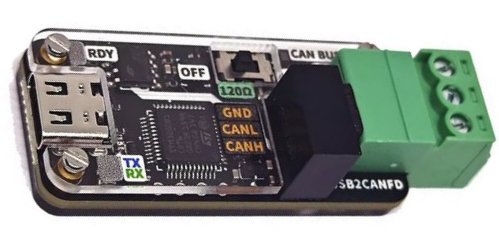


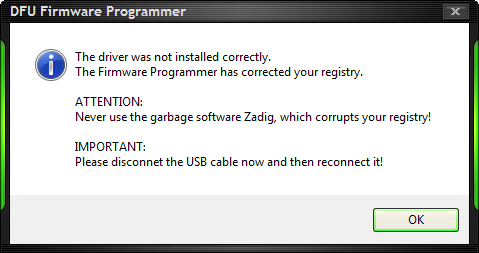








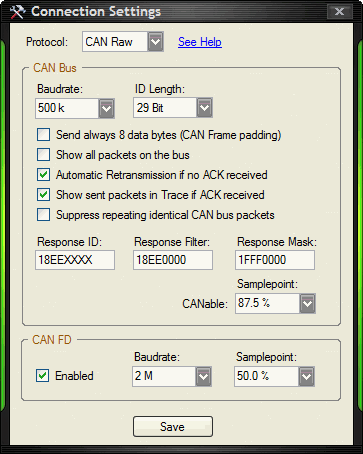

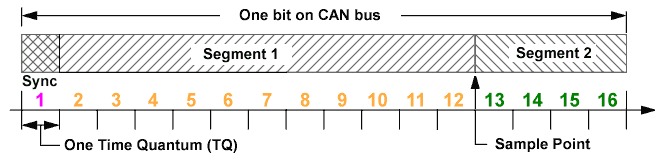

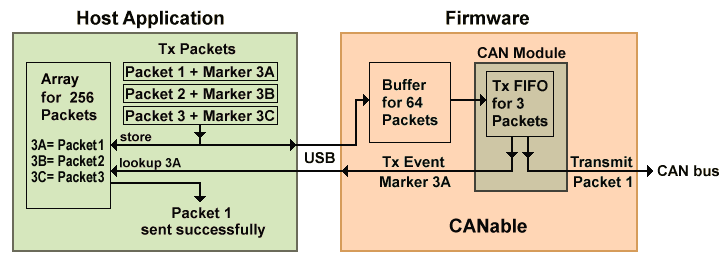
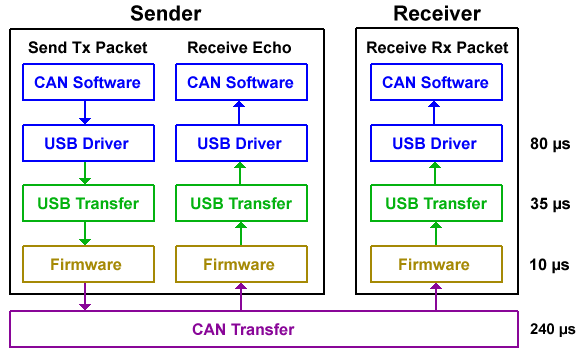
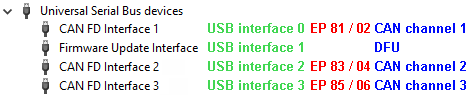

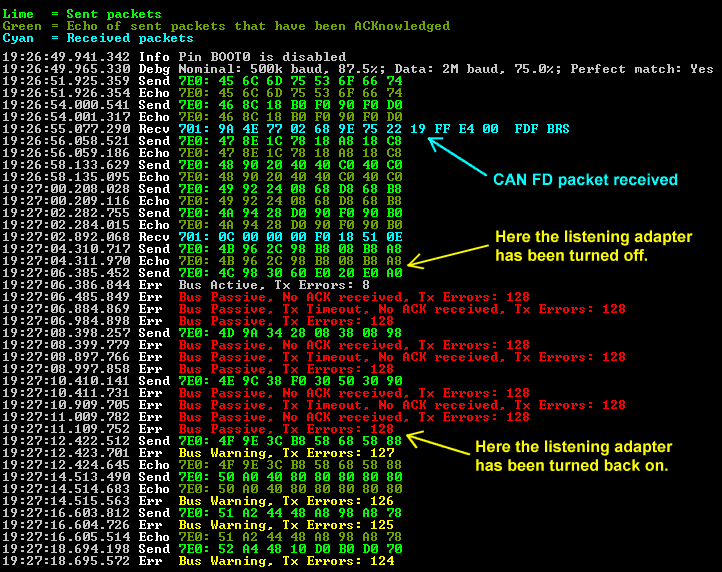
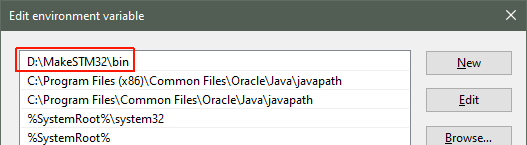
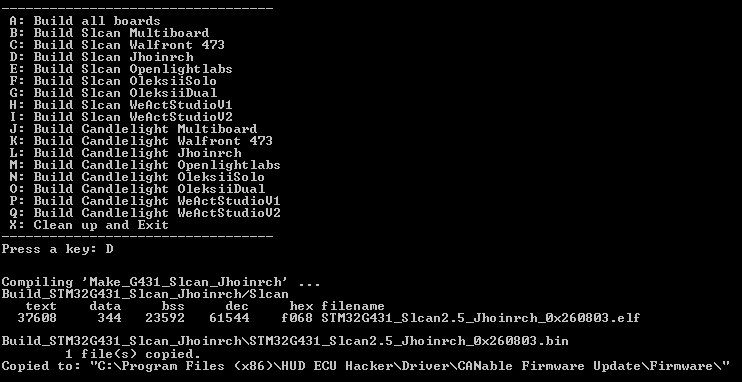
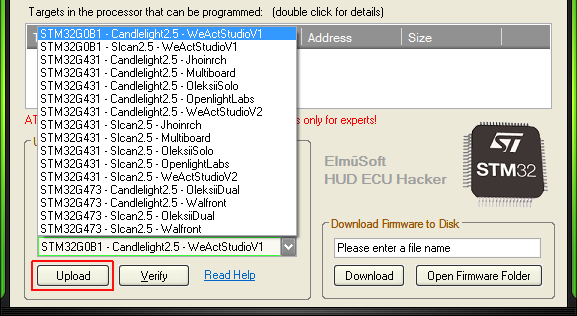
 You can write me in english, oder auf deutsch, o en español.